Users and permissions
Put your ACL resources in a role area, so roles reach your screens.
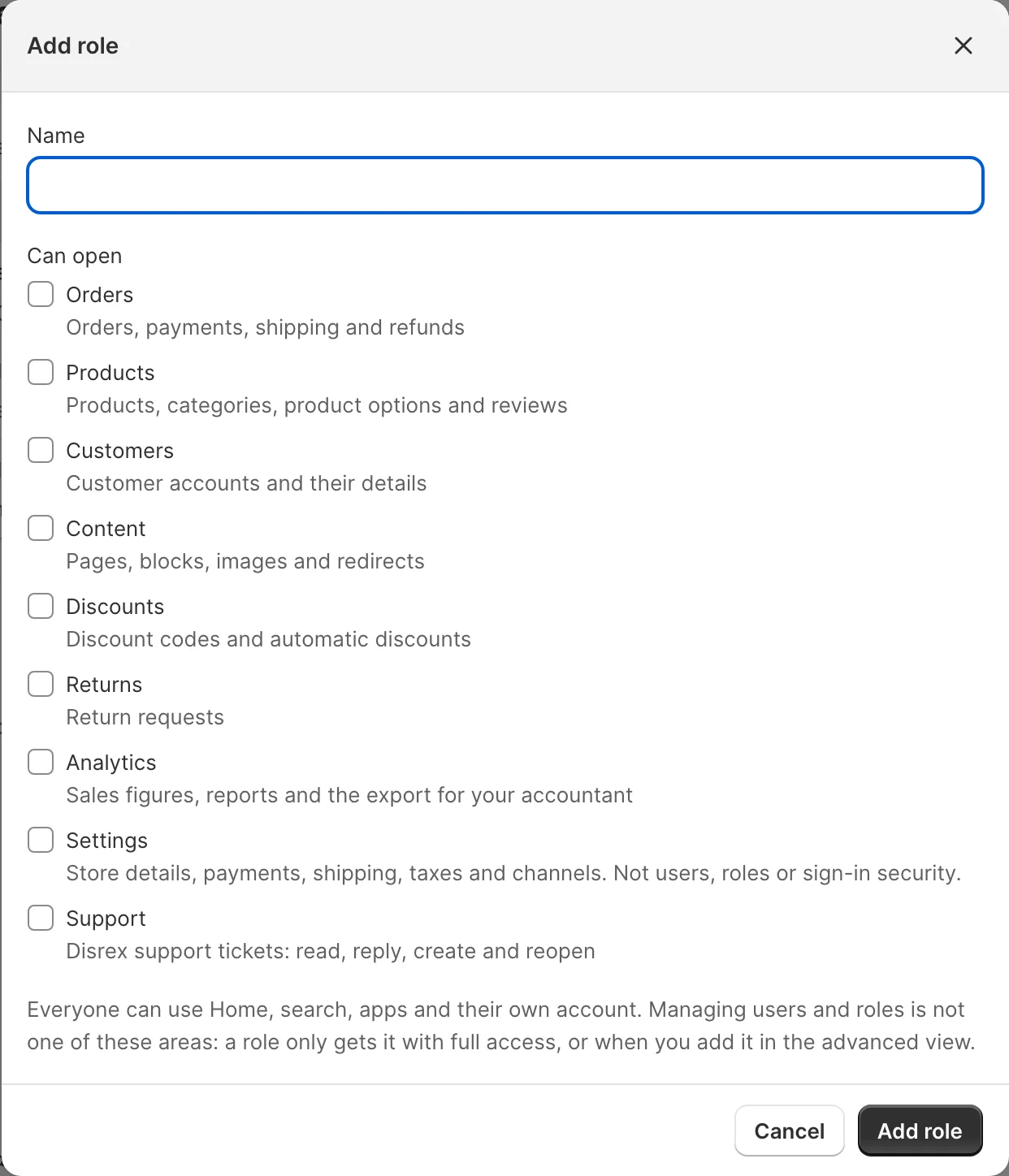
Light's roles are built from areas: Orders, Products, Customers, Content and so on. The Staff preset and every custom role tick areas, not ACL resources. This recipe puts your module's resources in an area, so users whose role ticks that area reach your screens.
When to use it
- Your screens sit under a core section (Built for Light, rule 1) and their ACL resources hang under your module's own menu, which no area covers. Without this, only full-access admins see them.
- Add your resources to the area whose screens yours sit beside. Don't add an area for one module.
Steps
Role areas (pool role_areas) are global: they go in etc/di.xml, because setup:upgrade reads them. Add your module's top resource as a later item of the area. The pilot adds its account requests to Customers:
<type name="Mrx\Settings\Model\Users\RoleAreas">
    <arguments>
        <argument name="areas" xsi:type="array">
            <item name="customers" xsi:type="array">
                <item name="resources" xsi:type="array">
                    <item name="account_requests" xsi:type="string">Disrex_RequestAnAccount::registration_requests</item>
                </item>
            </item>
        </argument>
    </arguments>
</type>- DI merges it into the core area as a later item, so the area's main resource stays the core one.
- The resources below yours in
acl.xmlcome with it: view, update, delete and your settings. - Don't add resources to
RolePresets(poolrole_presets): a preset role that already exists keeps its resources.
Then run bin/magento setup:upgrade --keep-generated. Preset roles that already exist pick up the new resources on every setup:upgrade; new preset roles and custom roles get them when the area is ticked.
Besides its areas, every role Light makes gets the same few resources: Home, Light, search, the user's own account and the user's own second factor (Magento_TwoFactorAuth::tfa, without which Magento_TwoFactorAuth refuses the sign-in after the password). They are no area and show no checkbox. On the next setup:upgrade the Staff and Shipping staff preset roles (named so and holding Mrx_Light::light) get any they lack, and every other role that holds Mrx_Light::light without full access, also one made in Magento's own role editor with Light ticked, gets the second factor if it lacks it; a resource such as Home that a merchant removed in the advanced view stays removed. The second factor comes alone, without its parents Magento_Backend::system and Magento_User::acl (since 0.4.6): Magento allows a resource whose parent the role is denied, and Magento_Backend::system itself opens admin/system/*, the Varnish VCL export and the media storage sync. A role keeps System when an area needs it (the cache screen of Settings sits below System). Light's own screens only add, so a role saved before 0.4.6 keeps the parents it held until it is saved in Magento's own role editor with Light ticked, which drops them again, or until you untick System in the advanced view. A role saved in Magento's own role editor with Light ticked gets the second factor on that save too (since 0.4.3), without its parents (Magento's role tree posts them with every ticked resource; Light drops them unless another ticked resource sits below them), and nothing else; "All resources" and roles without Light are saved as ticked. In Magento the second factor also opens the web API routes that name a user (/V1/tfa/user-providers/:userId, providers-to-activate/:userId and default-provider-code/:userId); since 0.4.4 an admin token uses them for another user only when its role also holds user management (Magento_User::acl_users), so a Light role reaches its own user's second factor alone. Full access and integrations keep Magento's behaviour: an integration that holds the second factor resource can still read and change any admin's second factor, so give that resource to an integration only when it should. Don't put your module's resources there: join an area.
Preset roles
The Staff and Shipping staff presets become roles the first time someone gets them, through Add user or the role editor. Such a role holds exactly its areas and the resources every role gets, each with the resources below it, plus their parents. A parent comes alone: Magento_Backend::stores above a setting, or Magento_Backend::system above the cache screen, never brings the configuration or the user and role screens below it. The second factor brings no parent at all. A resource you join to an area reaches a preset role only through that area.
Light 0.1.0 to 0.1.2 broke that rule for roles made through Add user: they got every resource of the admin. The first setup:upgrade on 0.1.3 resets a role that carries that leak (named Staff or Shipping staff, holding Mrx_Light::light and both Magento_User::acl_users and Magento_User::acl_roles) to exactly its preset, and logs what it removed; a role without Mrx_Light::light is never reset or completed, whatever its name. Only on a shop that ran 0.1.0 to 0.1.2, whose role completion gave Light to any role named Staff or Shipping staff, can a merchant's own role of that name carry the signature (Upgrading from 0.1.2 to 0.1.3). A module that gives a preset role a resource outside the areas, in its own data patch, loses it there; join an area instead.
An area's exclude list names resources below it that stay with the owner: the Settings area leaves out sign-in security and developer settings, the Products area the reservation clean-up (MageOS_InventoryReservationsGrid::clean and ::delete) since 0.1.4. A role that held such a resource before keeps it on setup:upgrade, because role completion only adds. The next release's first setup:upgrade takes it from the Staff and Shipping staff roles Light made, once, and logs what it took; saving a preset role in the role editor takes away what its areas exclude every time. A custom role keeps what it has outside its areas (Upgrading).
What the admin sees
A Staff user sees Customers > Account requests and can work there. A custom role with Customers ticked reaches it too.
The invite
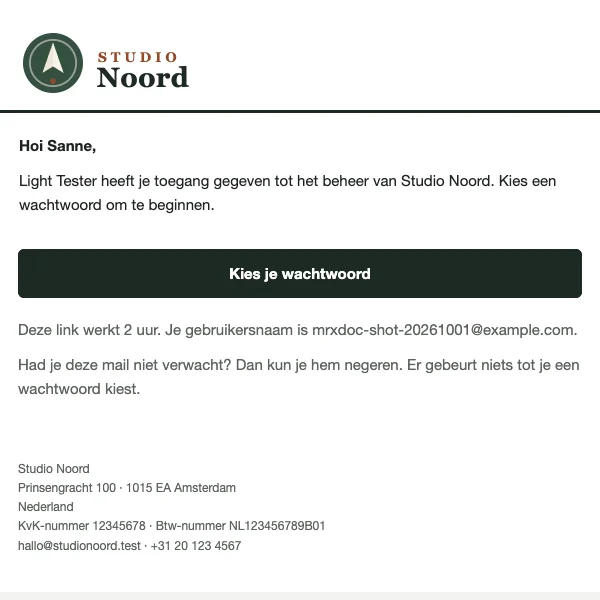
Adding a user on Settings > Users shows no password. Light mails the new user "You now have access to" the store name, with a button to choose a password on Magento's own admin reset page. The link works as long as admin/security/password_reset_link_expiration_period says (2 hours by default), and the mail says so. It goes out in the user's admin language, in the brand kit of the main channel. When the mail fails, the screen shows the link to pass on instead. "Send invite again" in the user's row sends a new link until the user first signs in.
ACL
The area grants your resources; your controllers, nav items and counters still check them one by one.
Check it
bin/magento mrx:light:doctor --module=<your module>:acl_unreachablewarns when your module adds Light screens and no area reaches any of its resources (one reached resource is enough for the rule, so check each screen in the browser), andwrong_areaaboutRoleAreasinetc/adminhtml/di.xml.tests/playwright/users-and-permissions.spec.tsmust still pass, and the pilot's browser test checks an existing Staff role.- A browser test that adds a user reads the invite link from the mail, as
tests/playwright/user-invite.spec.tsdoes; the answer oflight/settings/usercreateholds no password.
Pitfalls
- A new area added to a preset reaches only roles made afterwards. Add your resources to an existing area instead.
- A resource under an area is granted, never taken away: removing your item later leaves the grant on roles that have it.
Last updated on