Your module's email and document
Customer emails and PDF documents in the shop's look: the body-only contract, the classes, the two tokens, the documents, item_lines, document_sections and pick_locations pools, a client format, and what an agency can change.
Every customer email a Light shop sends, and every order confirmation, invoice, credit memo, packing slip and return slip it prints, wears one look: the store's logo, the accent colour the owner picked, a footer with the company details from Business details, and one of three formats (Clean, Bold, Letter). Mrx_Documents holds that brand kit, and the owner changes it on Settings > Emails & documents. Your module writes only the body of its email or PDF; Light draws the rest. Emails come first, then your module's document, a client format and what an agency can change.
When to use it
- Your module sends an email to a customer: a confirmation, a status change, a message. Write the body only, in the shop's own warm voice (Built for Light, rule 6).
- Your module's email has a visual need the classes below don't cover: a small
{{inlinecss}}file of your own, with the two tokens for the accent. - Your module prints a document for the shop or its customer: a delivery note, a voucher, a certificate. Add a type to the
documentspool and write its body. - Your module has its own product type, and its items need more than a name, a SKU and a quantity on an invoice: an item line in the
item_linespool. - Your module adds something to a document it doesn't own, such as the pickup point on the packing slip: a section in the
document_sectionspool. - Your module knows where products are stored: bin locations for the picklist in the
pick_locationspool. - An agency builds one look for many shops: a format in the
formatspool. The colour, the logo and the footer stay the owner's settings. - An agency changes one shop's look: start on the settings screen and go further only when it falls short (light to heavy).
How a mail gets its look
A body starts with the stock header include and ends with the stock footer include. Light maps both to its own shell and fills in the brand kit of the mail's store:
MapShellIds, abeforeplugin onAbstractTemplate::loadDefault(), loadsmrx_documents_email_headerandmrx_documents_email_footerwhere the stock idsdesign_email_header_templateanddesign_email_footer_templateare asked for.- The header puts
email.css(dark mode, phones, client fixes) in a<style>and inlinesemail-inline.cssand the format's own file. Each file passes throughCss\Processor::process(), whereSwapCssTokensfills the tokens with the brand kit of the store the mail renders for. AddDocumentVariablesaddsmrx_format, the logo, the footer text, the company lines andmrx_accent, so the wrapper table carries the classmrx-f-<format>.ApplyEmailTextsputs the subject, opening text and button text the owner saved in Settings > Customer emails into a body of theemailspool as it loads (step 5).AddPlainTextPartadds a plain-text part when the mail is sent (A plain-text part).- A header the owner saved in Marketing > Email Templates still wins, and the doctor says so (
email_shell_config). "Magento classic" (Stores > Configuration > Sales > Emails and documents (Light) > Advanced) switches the whole look off.
Your module's email
1. Register the template
Declare the body in etc/email_templates.xml, in the frontend area, as html:
<template id="mrx_returns_email_customer_new" label="Return request received (customer, Light)" file="customer_new.html" type="html" module="Mrx_Returns" area="frontend"/>2. Write only the body
The header include is the first line after the comments, the footer include the last line. Everything between them is yours:
{{template config_path="design/email/header_template"}}

<table>
    <tr class="email-intro">
        <td>
<p class="greeting">{{trans "%name," name=$customer_name}}</p>{{template config_path="design/email/footer_template"}}A body without the includes goes out without the logo, the footer and the styles; the doctor reports email_shell.
3. Use the email classes, not inline styles
The shell styles a fixed set of classes, and each format restyles them. Put the class on the element and leave colour, font and spacing to the format:
| Class | Use it for |
|---|---|
email-intro, greeting | The opening row and the salutation; Settings > Customer emails edits the first cell of email-intro |
email-summary, email-information | A headline row (an order or tracking number) and the details row under it |
order-details, address-details, method-info | Two columns of addresses or methods; they stack on a phone |
email-items, item-info, item-qty, item-price, item-subtotal, product-name, sku, item-options | A table of items |
order-totals, grand_total, price | The totals under an items table |
button, inner-wrapper | A button in the accent colour |
message-info, mrx-note | A tinted note box |
shipment-track | Carrier and tracking number |
mrx-thumb, mrx-muted, mrx-items-title, no-link | A product image, secondary text, a heading above a table, text a mail app must not turn into a link |
The full list is versioned: the email-class lines of the surface snapshot. A class not on that list may change in any release. email-intro isn't on it, because no CSS styles it: it marks the row whose first cell the Customer emails editor replaces.
A button is two tables with a link inside. Outlook on Windows doesn't draw a rounded, coloured link, so the cell holds the button twice: a VML v:roundrect for Outlook, filled with {{var mrx_accent}}, and the <a> for every other mail app. Light's order confirmation:
<!--mrx:button-->
<table class="button" role="presentation" width="100%" border="0" cellspacing="0" cellpadding="0">
    <tr>
        <td>
            <table class="inner-wrapper" role="presentation" border="0" cellspacing="0" cellpadding="0" align="left">
                <tr>
                    <td align="center">
                        <!--[if mso]><v:roundrect xmlns:v="urn:schemas-microsoft-com:vml" href="{{var mrx_order_url}}" style="height:44px;v-text-anchor:middle;width:220px;" arcsize="12%" stroke="f" fillcolor="{{var mrx_accent}}"><w:anchorlock/><center style="color:#ffffff;font-family:Arial,sans-serif;font-size:15px;font-weight:bold;">{{trans "View your order"}}</center></v:roundrect><![endif]-->
                        <!--[if !mso]><!--><a href="{{var mrx_order_url}}" target="_blank">{{trans "View your order"}}</a><!--<![endif]-->
                    </td>
                </tr>
            </table>
        </td>
    </tr>
</table>
<!--/mrx:button-->- Give both the same link and the same
{{trans}}text. - Light keeps the VML text white, because Outlook doesn't get the text colour that goes with the accent.
- The VML carries two
styleattributes, and the doctor counts them with the rest: a body with one such button has onestyleleft beforeemail_inline_style. - The
<!--mrx:button-->markers let the owner change the button's text (step 5). Leave them out when your email isn't in theemailspool.
An items table takes the same classes as Magento's own:
<table class="email-items mrx-return-items" cellpadding="0" cellspacing="0">
    <thead>
        <tr>
            <th></th>
            <th>{{trans "Product"}}</th>
            <th>{{trans "SKU"}}</th>
            <th class="item-qty">{{trans "Qty"}}</th>
Rules for a body:
- No inline colours or fonts. They survive the owner's format change and clash with Bold, Letter and dark mode.
- At most 3
styleattributes, for layout the classes can't express (a width, an alignment). The doctor reports more asemail_inline_style.
4. Your own CSS, with the two tokens
When the classes aren't enough, add a small CSS file of your own to the body with {{inlinecss file="Vendor_Module::css/email-yours.css"}}, right after the header include. Magento inlines it together with the shell's files, and SwapCssTokens fills two tokens in it:
| Token | Becomes |
|---|---|
__MRX_ACCENT__ | The owner's accent colour for the mail's store, or #1e2a24 when none is set |
__MRX_ACCENT_TEXT__ | White or near-black (#111111), whichever reads better on the accent |
- Write the token as a plain value:
color: __MRX_ACCENT__;. Not{{var ...}}, which breaks the CSS parse that inlines the styles, and notvar(--...), which Emogrifier doesn't resolve. - Other colours stay neutral greys, so the file works with every format and with dark mode.
- Magento skips a file that doesn't exist without an error, and then inlines no CSS at all: the mail loses Light's inline styles along with yours. Check the mail once in a mail catcher.
5. Let the owner edit the subject, the opening text and the button
Add your email to the emails pool in the global etc/di.xml, and Settings > Customer emails offers its subject and opening text for editing (A settings page from your system.xml, step 6). The editor finds the opening text in the first cell of the email-intro row, so keep that row first in the body. Two keys place the email further. Light's order confirmation sets both:
<item name="button" xsi:type="boolean">true</item>
<item name="group" xsi:type="string">orders</item>groupputs the email under Orders (orders), Account (account) or Returns (returns) in the preview picker of Emails & documents. Without it, the email is listed under Other modules.buttonset totrueoffers a third text, the button's, up to 40 characters. Put<!--mrx:button-->and<!--/mrx:button-->around the button's two tables. The editor swaps the{{trans}}text of the<a>and of Outlook's VML<center>inside them, and leaves the link and the rest of the button alone.subjectandintroaretruewhen you leave them out. Set one tofalsewhen your module writes that part anew for each mail; the editor then doesn't offer it.
The preview and the test email of your mail use the newest order of the channel and show what that order can't supply as {placeholders}. To preview it with real values, add a class that implements Mrx\Settings\Model\CustomerEmails\PreviewVariablesInterface to the email_previews pool, an Mrx\Settings\Model\CustomerEmails\EmailPreview argument providers keyed by the email's code. It returns the template variables, the recipient and a source line such as "Shown with return RMA-12.", or null while there is nothing to show. Light's Returns registers its two emails this way. The preview only runs in the admin, so this one goes in etc/adminhtml/di.xml:
<type name="Mrx\Settings\Model\CustomerEmails\EmailPreview">
    <arguments>
        <argument name="providers" xsi:type="array">
            <item name="return_new" xsi:type="object">Mrx\Returns\Model\Backend\Rma\ReturnPreview\Proxy</item>
            <item name="return_status" xsi:type="object">Mrx\Returns\Model\Backend\Rma\ReturnPreview\Proxy</item>
        </argument>
    </arguments>
</type>
The merchant's texts are config rows (mrx_settings/email_texts/<code>/subject, intro, guest_intro and button) per default, channel or language, not a copy of your template. Light puts them into the body each time the mail renders from its file, so a fix in a later release of your module reaches shops that edited the texts. A template the owner picked in Marketing > Email Templates loads by its number and gets no texts; saving texts in Customer emails sets that scope back to the standard template, so the texts show. Because texts apply wherever the mail renders, the pool is global: an email registered in etc/adminhtml/di.xml gets its texts only in mails sent from the admin, and the doctor reports wrong_area.
Light's order, invoice and shipment mails
Light writes its own bodies for the three mails customers read most, each with a guest version, and points Magento's config paths at them:
| Config path | Template ids | |
|---|---|---|
| Order confirmation | sales_email/order/template, guest_template | mrx_documents_order_template, mrx_documents_order_guest_template |
| Payment received | sales_email/invoice/template, guest_template | mrx_documents_invoice_template, mrx_documents_invoice_guest_template |
| Shipping confirmation | sales_email/shipment/template, guest_template | mrx_documents_shipment_template, mrx_documents_shipment_guest_template |
- They keep Magento's variables,
payment_htmland theemail-introrow, so a payment module's link inpayment_htmland the variables your observer adds still reach the mail. - The order and payment mails have a "View your order" button; a guest's leads to the guest order form. The shipping mail has "Track your parcel" when the shipment has a tracking number, and no tracking block when it has none.
- The item rows show a product picture. Light sets its own item template on the
defaultrenderer ofsales_email_order_renderersand its invoice, shipment and credit memo twins; a renderer of your own product type keeps its template, and its rows line up without a picture. - "Magento classic" sends Magento's own bodies again. A body the owner picked in Marketing > Email Templates still wins, because a numeric config value never loads a file.
The variables of the sales bodies
AddSalesEmailVariables observes email_order_set_template_vars_before and the invoice, shipment and credit memo events (Events) and adds these variables, which your own body for a sales mail can read too:
| Variable | Holds |
|---|---|
mrx_order_url | The order in the customer's account, or the guest order form for a guest |
mrx_created_at | The order date, in the language and time zone of the mail's store variable (the order's store when Magento sends it) |
mrx_invoice_date | The invoice date, as mrx_created_at (invoice mails only) |
mrx_has_tracking | 1 when the shipment has a tracking number, else empty, for {{depend}} (shipment mails only) |
mrx_track_url | The tracking page of the first tracking number |
mrx_track_number, mrx_carrier | The first tracking number and its carrier's title |
A plain-text part
Every mail the shop sends, yours included, goes out with a plain-text part next to its HTML. AddPlainTextPart, a before plugin on Magento\Framework\Mail\TransportInterface::sendMessage(), makes it from the HTML when the message has none: headings and paragraphs on their own lines, a link as text (url), an image as its alt text. A message that already has a text part keeps its own, and attachments stay where they are. So give an image an alt and a link text that reads without the picture.
Copies of sent mails
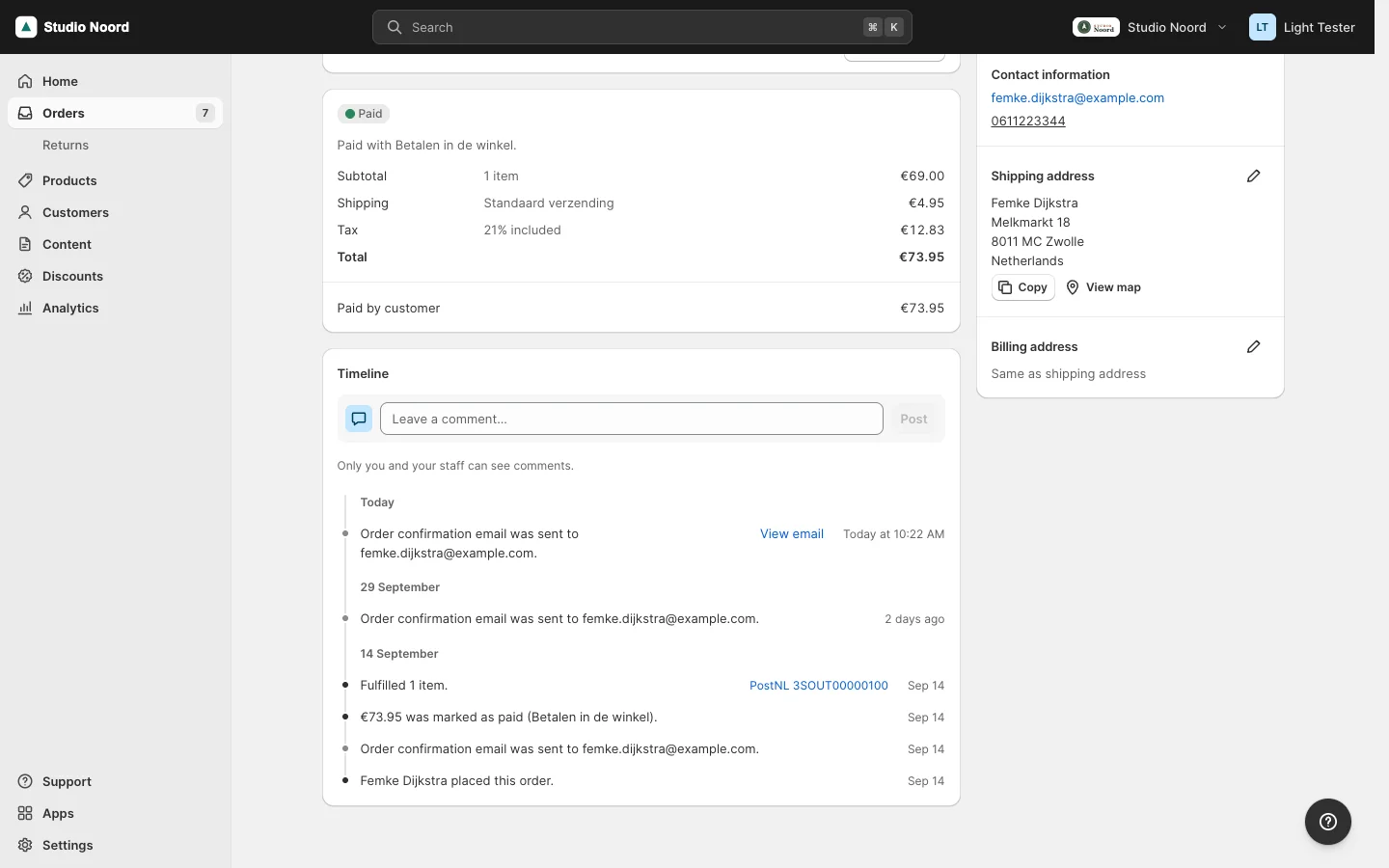
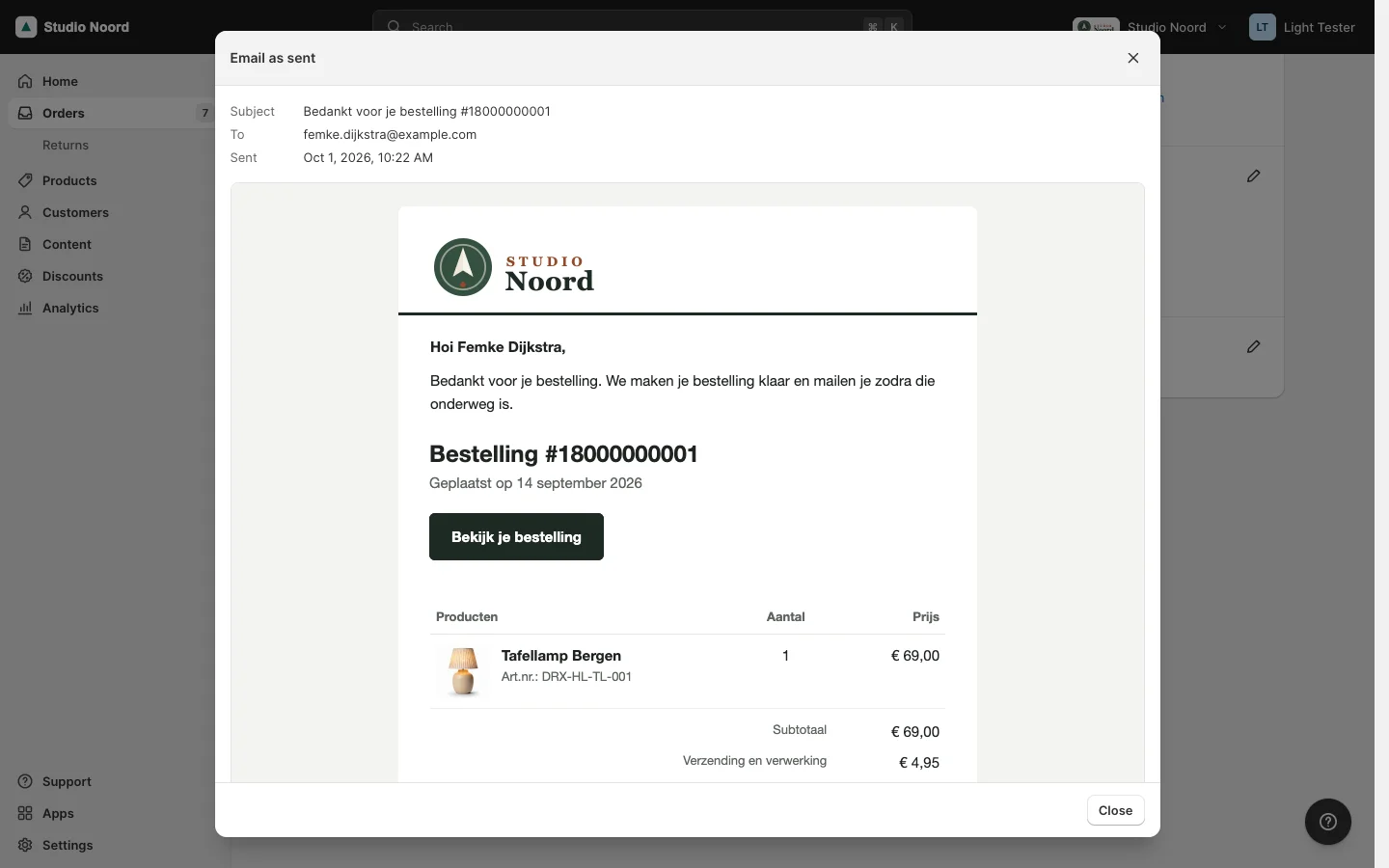
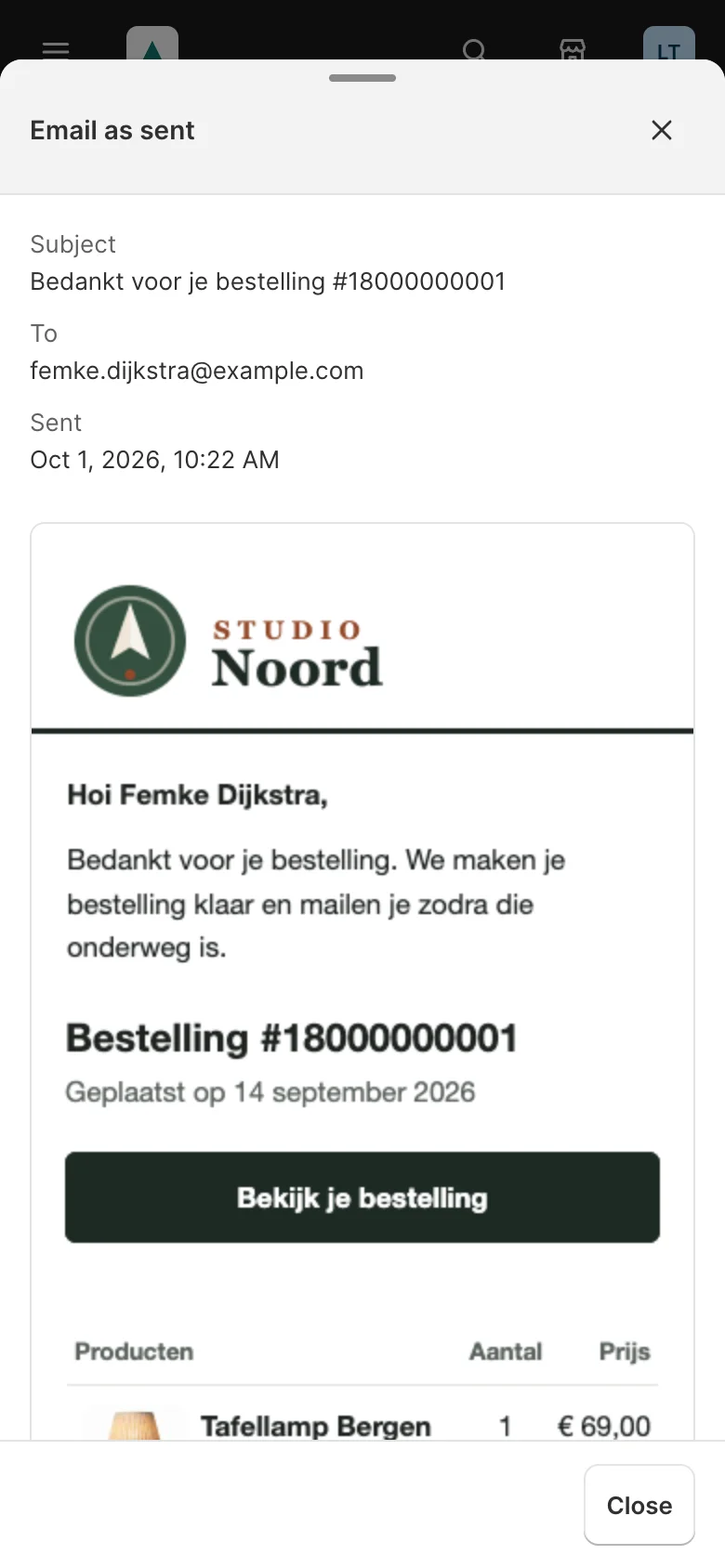
Light keeps an exact copy of every customer mail about an order. On the order page, the timeline line of that mail gets a View email button, which opens the mail as the customer got it: the subject, the To and Cc addresses, the send time, the names of the attachments and the HTML, in a frame without scripts.
Which mails get a copy
Your module's mail gets a copy when both of these hold:
- Its template vars name the order:
order(the order object),order_id, orrma(an object withgetOrderId()). - One of its To addresses is the order's customer email or the email of the customer's account. Case and spaces don't count. Mails to staff, and the separate "copy to" mails of the sales senders, go to other addresses and get no copy.
Light's contact mail passes the order's id next to its number for this:
'order_increment_id' => $order !== null ? (string)$order->getIncrementId() : '',
'order_id' => $order !== null ? (int)$order->getEntityId() : 0,
Two plugins take the copy while the mail is sent: one on Magento\Framework\Mail\Template\TransportBuilder notes the template id and the vars, one after TransportInterface::sendMessage() stores the message. So every sender that builds its mail with the TransportBuilder gets copies: the stock sales senders, Light, payment and return modules, cron and the CLI. A mail that fails to send gets no copy, and nor does a mail sent while Stores > Configuration > Advanced > System > Mail Sending Settings > Disable Email Communications is on. Taking the copy never costs the mail: when it fails, Light logs a warning and the mail goes out as before.
A mail that carries a secret, such as a link or a token the customer can pay or sign in with, must not be kept. Pass 'mrx_no_copy' => true in its template vars and Light keeps no copy of it. Light also skips the payment-link mails of Mollie and Pay., which it knows by their payment_token and paylink vars.
What is kept, and for how long
| Kept | Not kept |
|---|---|
| The subject, the To and Cc addresses, the HTML part as sent, the names of the attachments, the send time in UTC, the template id, and which document the mail belongs to (order, invoice, shipment or credit memo) and whether it was that document's first mail | The Bcc addresses, the bytes of the attachments, the plain-text part, the From address, the store, and who sent it |
- The HTML is compressed in MariaDB's
COMPRESS()format, about 5 KB for an order confirmation, so an order with five mails takes about 25 KB. - A copy lives as long as its order. Deleting the order deletes its copies (a foreign key with
ON DELETE CASCADE). Deleting the customer's account keeps them, as it keeps the order. There is no setting and no clean-up job. - An erasure or anonymise flow that changes an order must delete that order's copies as well.
- The table and the classes that read it are internal. Read a copy through the order page, not from your module.
How a mail gets its link
Mrx_Orders reads the order's copies when it draws the timeline and gives each copy one line:
- The "…email was sent to…" lines of the order, its invoices, shipments and credit memos take the first mail of their own document, and show when that mail went out. A mail counts as the document's own when its template id is the store's
sales_email/<kind>/templateorguest_template. - A notified history row (
is_customer_notified= 1) takes a copy sent within 10 seconds of the row, before or after, that is not a document's first mail. So write the row right after you send the mail, as Light's cancel does:
if (!$this->cancelNotifier->send($order, $reason)) {
    return false;
}
$this->history->addEvent($order, (string)__('Cancellation email was sent to %1.', $order->getCustomerEmail()), true);- A copy that no line takes gets a line of its own with its subject and recipient,
Email “%1” was sent to %2.A resend from Magento's own order or invoice screen shows this way.
Every copy is reachable from the timeline, with or without a history row of yours. Lines from the order_timeline pool can't open the viewer: a link on a provider line stays a plain link. Orders placed before Light kept copies, and mails whose copy was skipped, keep their lines without a button.
Your module's document
The same brand kit prints the shop's PDFs. Light renders order confirmations, invoices, credit memos, packing slips, the picklist and return slips from its own templates with dompdf, and every print button, mass action and the accountant ZIP gets that PDF. Your module's own document is a type in the documents pool. It writes only the body; Light adds the letterhead with the logo and company details, the title with the number and date, the footer, the page numbers and the owner's format.
Enginegroups the documents by store view and prints at most 25 in one dompdf run, then merges the runs into one file. A batch of two channels lists one channel's documents, then the other's.- Each run renders in the frontend area of the documents' store view with a fresh layout, so
__()prints in the store's language whichever area asked for the PDF, and the store's theme can override the templates and the CSS. - Page numbers ("Page 1 of 2") print only when the file holds one document that runs over a page.
- Paper is A4. The text is Inter, with DejaVu Sans for the characters Inter lacks, so "Łukasz" and "Анна" print right; Letter sets its headings in a serif. There is no font setting.
- dompdf sits behind
Mrx\Documents\Api\PdfRendererInterface. A shop that runs Gotenberg or mPDF sets a preference for it:render($html, $options)gets one HTML page with its CSS and its fonts asfile://URLs, and returns the PDF bytes. Light merges the runs and hands the stock callers their PDF throughZend_Pdf, so the file needs a classic xref table, not an xref stream.
1. Write the document type
A type implements Mrx\Documents\Api\DocumentTypeInterface. Light's credit memo is one:
    public function getLabel(): string
    {
        return (string)__('Credit memos');
    }

    public function getAclResource(): string
    {
        return 'Magento_Sales::sales_creditmemo';
    }

    public function getTemplate(): string
    {
        return 'Mrx_Documents::documents/creditmemo.phtml';
}| Method | Returns |
|---|---|
getLabel() | The type's name in the plural |
getAclResource() | The resource an admin needs to download it |
getTemplate() | Vendor_Module::path/body.phtml, a frontend template that holds only the body |
getData(array $ids) | One Mrx\Documents\Api\Data\Document for each id you know, in the order of the ids |
getFilename(array $ids) | The name of the downloaded file |
A Document holds storeId (the store view whose language and brand kit print it), title and number for the heading ("Credit memo CM000012"), date as it should print, and data, an array your template reads. Light reads one key of it: locale, a locale code such as en_US, prints the document in that language instead of the store view's, as the picklist does with the admin's; leave it out for a customer's document. title and date print as given, so make them in the document's language and date format. Load what the template needs for all ids in one query: a bulk action passes up to 250.
2. Add it to the documents pool
Register the type in the global etc/di.xml, because PDFs print from the admin, the storefront, cron and the REST API. Mrx_Documents registers its own three like this:
<type name="Mrx\Documents\Model\Pdf\DocumentTypes">
    <arguments>
        <argument name="types" xsi:type="array">
            <item name="order" xsi:type="object">Mrx\Documents\Model\Pdf\Types\OrderType\Proxy</item>
            <item name="invoice" xsi:type="object">Mrx\Documents\Model\Pdf\Types\InvoiceType\Proxy</item>
            <item name="creditmemo" xsi:type="object">Mrx\Documents\Model\Pdf\Types\CreditmemoType\Proxy</item>
        </argument>
    </arguments>
</type>
An item is the type object, or an array with type, module and sort_order when the type needs a module gate. The key is the code the download URL names; give yours your vendor's prefix, such as acme_delivery_note. A \Proxy keeps the pool cheap: the screens that list the types don't build their dependencies.
3. Write only the body
Light's page template renders your template once per document, after the letterhead and the title, with the Document in the block's document data. Build the body from four blocks, each styled by every format:
| Class | Use it for |
|---|---|
doc-parties | A table of two or three columns: td.doc-party for an address under an h2 label, td.doc-meta for numbers, dates and methods |
doc-items | The items table: doc-col-product and doc-col-sku cells, doc-num for a right-aligned number, doc-item-name and doc-option inside the product cell |
doc-totals | Rows of a th label and a td.doc-num amount; tr.doc-total-strong for the grand total |
doc-note | Closing text: p.doc-paid for a status line, p.doc-comment for a comment |
Put a number or a code in span.doc-number, so "INV-250" never breaks at the hyphen. The credit memo ends with its note:
<?php if ($refundedOn !== '' || $notes !== []): ?>
    <div class="doc-note">
        <?php if ($refundedOn !== ''): ?><p class="doc-paid"><?= $escaper->escapeHtml(__('Refunded on %1', $refundedOn)) ?></p><?php endif ?>
        <?php foreach ($notes as $note): ?><p class="doc-comment"><?= $escaper->escapeHtml($note) ?></p><?php endforeach ?>
    </div>
<?php endif ?>
Rules for a body:
- No inline colours or fonts: they clash with Bold and Letter.
- No
position: fixed. The page's footer is fixed and repeats on every page; a fixed element in a body piles up on every later page of a batch. - No URLs. dompdf loads nothing remote, and reads files only from
pub/mediaand Light's own folders: give an image as afile://path underpub/media. - Light's parts (
Mrx_Documents::documents/parts/*.phtml) read the keys of the invoice'sdataand may change. Copy their markup, not the templates. The same goes for anydoc-*class not in the table above.
4. Your own CSS in a document
When the classes aren't enough, start your body template with a <style> element and scope every rule with a class of your own. dompdf reads a <style> anywhere in the page, and Light fills the two tokens in the whole page before dompdf sees it, so <style>.acme-note { border-left: 2pt solid __MRX_ACCENT__; }</style> prints in the owner's accent. A PDF is always light: no dark mode. A format's own PDF rules go in its pdf_css file (The PDF file).
5. Print it
- A button or a bulk action links to
light/documents/downloadwithtypeandids:$this->getUrl('light/documents/download', ['type' => 'acme_delivery_note', 'ids' => '12,13']). The route checks the type'sgetAclResource(), takes up to 250 ids, answers 404 for an unknown type or when none of the ids exists, and names the file withgetFilename(). - Code that needs the bytes, for an attachment or a ZIP, calls
Mrx\Documents\Api\DocumentRendererInterface::render($type, $ids), orrenderDocuments($type, $documents)with documents you built yourself, such as a sample that was never saved.
6. An item line for your product type
The items of Light's order confirmations, invoices and credit memos come from the item_lines pool, keyed by product type; default serves every type without a line of its own. Magento's pdf.xml item renderers don't run while Light prints. A module with its own product type (a gift card, a subscription) adds a class that implements Mrx\Documents\Api\ItemLineInterface. Light's own lines:
<type name="Mrx\Documents\Model\Pdf\ItemLines">
    <arguments>
        <argument name="lines" xsi:type="array">
            <item name="default" xsi:type="object">Mrx\Documents\Model\Pdf\Line\DefaultLine</item>
            <item name="bundle" xsi:type="object">Mrx\Documents\Model\Pdf\Line\BundleLine</item>
            <item name="downloadable" xsi:type="object">Mrx\Documents\Model\Pdf\Line\DownloadableLine</item>
        </argument>
    </arguments>
</type>
getLines($item) gets one item of the invoice, credit memo or order confirmation (getOrderItem() gives the order item) and returns its rows. The order confirmation has no document items, so Light hands each order item over in the same shape: getOrderItem(), getQty() (the quantity ordered), the amounts, and getOrderDocument() in place of getInvoice() for a line that looks for its children. Light calls it only for an item without a parent; a line writes its children's rows itself, as bundle does. Each row is an array:
Prop
Type
Light's own document types
| Code | Module | Ids | Resource | Stock PDF it answers |
|---|---|---|---|---|
order | Mrx_Documents | Order ids | Magento_Sales::actions_view | None: Magento has no order PDF |
invoice | Mrx_Documents | Invoice ids | Magento_Sales::sales_invoice | Pdf\Invoice |
creditmemo | Mrx_Documents | Credit memo ids | Magento_Sales::sales_creditmemo | Pdf\Creditmemo |
packing_slip | Mrx_Orders | Order ids: what is left to ship, or what went out once everything shipped | Magento_Sales::actions_view | None |
packing_slip_shipment | Mrx_Orders | Shipment ids: one parcel | Magento_Sales::actions_view | Pdf\Shipment, so the shipment's print button and "Print All" |
picklist | Mrx_Orders | Order ids, up to 250, printed as one document | Magento_Sales::actions_view | None |
return_slip | Mrx_Returns | Return ids | MageOS_RMA::rma_manage | None: MageOS RMA has no PDF |
The packing slip lives in another module. Mrx_Documents doesn't know the packing slip or the picklist. Mrx_Orders adds them to the documents pool from its own etc/di.xml, the way your module would:
<type name="Mrx\Documents\Model\Pdf\DocumentTypes">
    <arguments>
        <argument name="types" xsi:type="array">
            <item name="packing_slip" xsi:type="object">Mrx\Orders\Model\Documents\PackingSlipType\Proxy</item>
            <item name="packing_slip_shipment" xsi:type="object">Mrx\Orders\Model\Documents\PackingSlipShipmentType\Proxy</item>
            <item name="picklist" xsi:type="object">Mrx\Orders\Model\Documents\PicklistType\Proxy</item>
        </argument>
    </arguments>
</type>
Its composer.json requires mrx/module-documents, and its etc/module.xml lists Mrx_Documents in the sequence. The body, Mrx_Orders::documents/packing-slip.phtml, draws its own items table instead of Light's parts: a slip shows quantities, and prices only when the owner switches on "Show prices" (mrx_documents/packing_slip/show_prices, per channel, off by default). Both packing slip types read their data from Mrx\Orders\Model\PackingSlip\SlipData, so the slip of an order and the slip of a parcel look the same. Under the customer's note the slip prints the gift messages (Magento_GiftMessage) of the order and of the items on that slip, from the data key gift_messages; without that module the list is empty.
The return slip lives in Returns. Mrx_Returns adds return_slip the same way, and gives it a module gate, so the type leaves the pool while MageOS RMA is off:
<type name="Mrx\Documents\Model\Pdf\DocumentTypes">
    <arguments>
        <argument name="types" xsi:type="array">
            <item name="return_slip" xsi:type="array">
                <item name="type" xsi:type="object">Mrx\Returns\Model\Documents\ReturnSlipType\Proxy</item>
                <item name="module" xsi:type="string">MageOS_RMA</item>
            </item>
        </argument>
    </arguments>
</type>
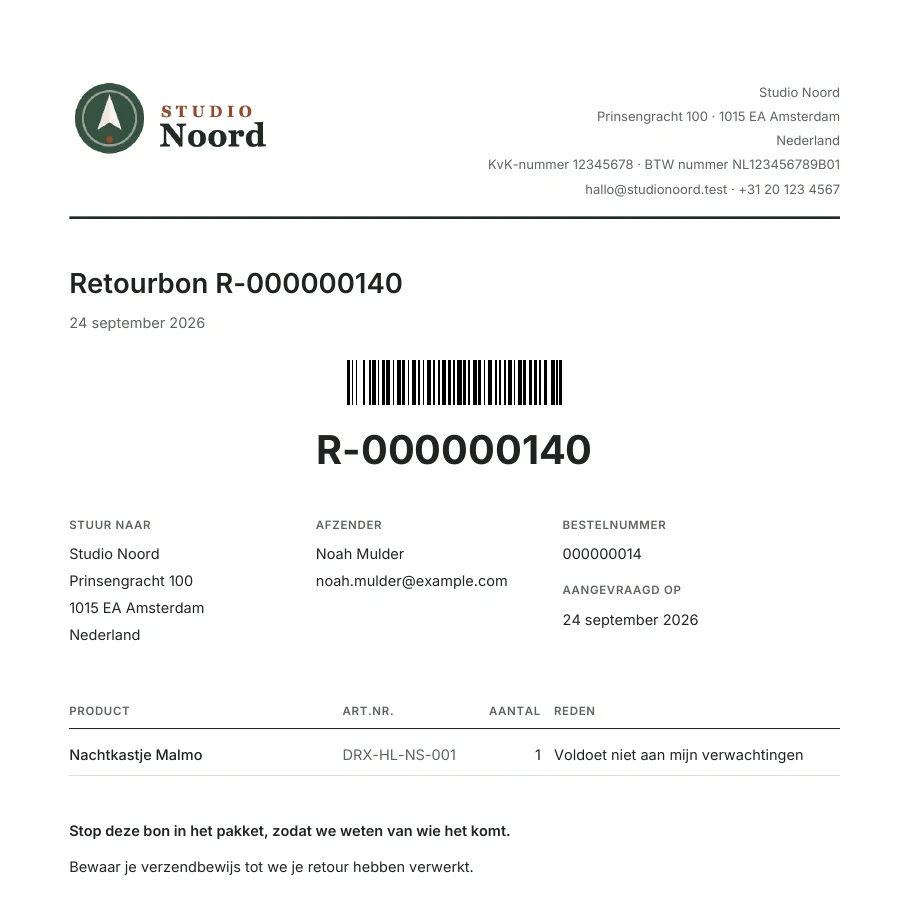
The customer puts the slip in the parcel, so its body, Mrx_Returns::documents/return-slip.phtml, prints what the warehouse needs to match the parcel to the return: the return number in large type with a Code 128 barcode above it, where to send the parcel, the customer, the order number, the request date, and the items with their quantity, reason and condition. The quantity is the one the owner approved, else the one the customer asked for. The address is the shipping origin when it has a street and a city, else the store address from Business details; a shop with a separate returns warehouse sets the shipping origin, or adds the address with a section (Add a block to a document). The barcode class, Mrx\Documents\Model\Pdf\Barcode\Code128, is internal. "Print return slip" in the More actions of a return links to light/documents/download once the owner has approved the return, and stays there while the parcel travels and after it arrives.
The order confirmation has no stock PDF behind it. No getPdf() hook maps to order, so it prints only through DocumentRendererInterface and light/documents/download, the same path a type of yours takes. "Print order" in the order page's More actions links to the download route with the order's id. The orders list's "Print packing slips", "Print picklist" and "Print order confirmations" ask their route (light/orders/packingslips, light/orders/picklist, light/orders/confirmations) before they open a tab, as "Print invoices" does: the answer says how many orders print and how many were skipped, and carries the link to the PDF with at most 250 ids, the most the download takes. The packing slip skips canceled orders, the picklist skips canceled orders and orders with nothing left to ship, and the order confirmation prints every order, canceled ones too.
The preview lists only types with a sample. The picker's Documents group shows a type only when it can build a sample, through an interface that is internal: Light's order confirmation, invoice, credit memo and packing slip. The picklist is a staff document over many orders, and packing_slip_shipment is the same slip as packing_slip, so neither shows. A type from your module prints and downloads like Light's, but doesn't show in the picker.
Add a block to a document
A module that adds something to documents it doesn't own, such as the pickup point a parcel goes to, registers a section in the document_sections pool: the argument sections of Mrx\Documents\Model\Pdf\Sections, in the global etc/di.xml. The section implements Mrx\Documents\Api\DocumentSectionInterface and returns the HTML to add, or '' to add nothing. The pickup point example the tests run:
    public function render(Document $document, LayoutInterface $layout): string
    {
        $lines = $this->points[$document->number] ?? [];
        if ($lines === []) {
            return '';
        }
        $escape = static fn (string $text): string => htmlspecialchars($text, ENT_QUOTES | ENT_SUBSTITUTE, 'UTF-8');

        // Rendered in the document's store view, so the heading is in the customer's language.
        return '<div class="doc-note"><p class="doc-paid">' . $escape((string)__('Pickup point')) . '</p><p>'
            . implode('<br>', array_map($escape, $lines)) . '</p></div>';
    }
Each item of the pool is an array; the fixture's docblock shows its etc/di.xml.
Prop
Type
documenttakes one type code, or*, and no patterns. The slip of an order (packing_slip) and the slip of a parcel (packing_slip_shipment) are two codes, so a pickup point on both needs two items; the fixture'setc/di.xmlhas a third fororder.*includes the picklist, whose number is the moment it was printed and whose language is the admin's. A section meant for customers names its types.- The section renders in the frontend area of the document's store view, so
__()prints in the customer's language. Usedoc-notefor a box in the owner's format; the rules for a body apply. - A section that throws is logged and left out, and the document prints without it.
- Light's own types print the sections at all three positions; the packing slip and the picklist, which have no totals, print
after_totalsafter the items. A type of yours prints them only where its body calls thesectionsclosure that Light puts in the block's data, as the packing slip does:
$sections = $block->getData('sections');
$section = static fn (string $position): string => $sections instanceof \Closure ? $sections($position, $document) : '';
Bin locations on the picklist
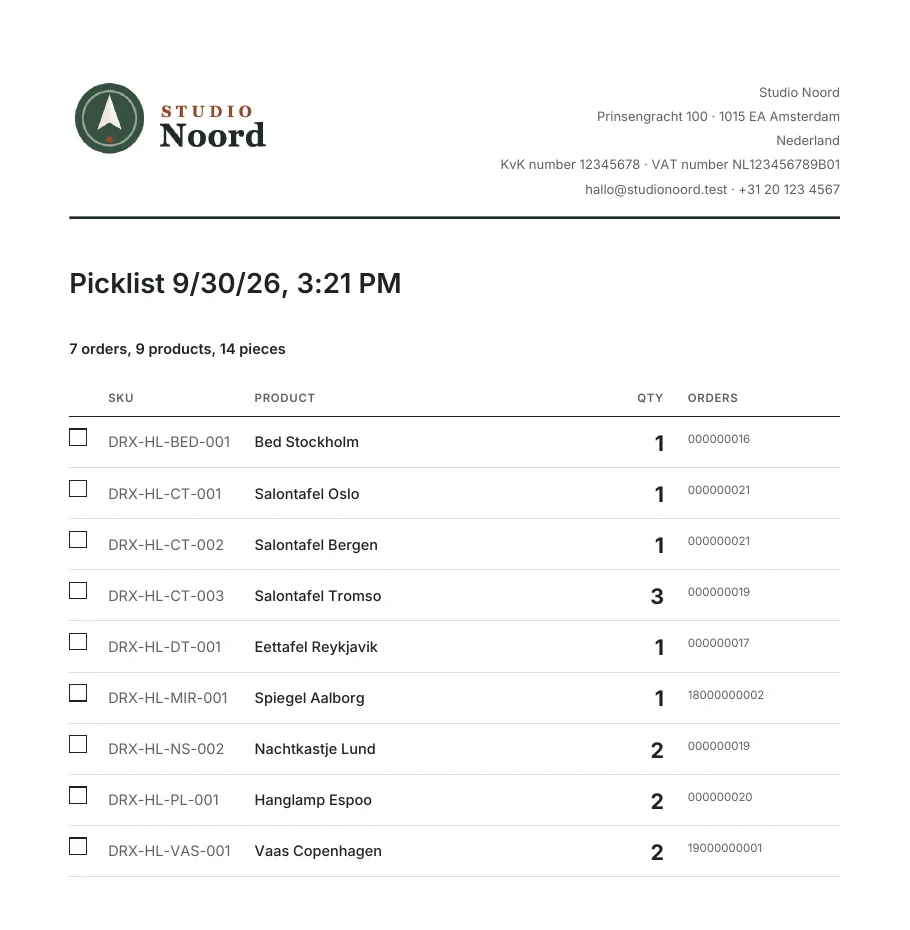
"Print picklist" on the orders list prints one table over up to 250 selected orders: every product still to ship, with its SKU, name and options, the total quantity and the order numbers. Light keeps no stock locations. A module that knows where products are stored adds a source to the pick_locations pool: the argument locations of Mrx\Documents\Model\Pdf\PickLocations, in the global etc/di.xml, each item an object that implements Mrx\Documents\Api\PickLocationInterface. The example the tests run reads its bins from a list; the fixture also records every call for the test:
    public function getLocations(array $skus, int $storeId): array
    {
        $this->calls[] = [$skus, $storeId];

        return array_intersect_key($this->bins, array_flip($skus));
}getLocations()gets every SKU on the picklist in one call, with the store view the picklist prints for: the main channel's default store view. Return SKU => location, such as"A-03-2", and leave out the SKUs you don't know.- When any row has a location, the picklist gets a Location column and sorts by it, in natural order, with the rows that have none last. Without locations it sorts by SKU.
- With several sources, the later item in the pool wins for a SKU both know. A source that throws is logged and skipped; the picklist prints with what the others know.
Plugins on the stock PDF classes
While Magento classic is off, an around plugin answers getPdf() of Magento\Sales\Model\Order\Pdf\Invoice, Creditmemo and Shipment and never calls the stock method. The shipment PDF is the packing slip (type packing_slip_shipment, supplied by Mrx_Orders); when that module or the type is missing, the plugin proceeds to the stock PDF. A plugin or a preference on the drawing code behind it (insertOrder(), _drawItem(), insertTotals(), the item renderers pdf.xml lists for invoices, credit memos and shipments) stops running, with no error. The doctor lists each one as pdf_inner_plugin. One thing keeps working: the total models of pdf.xml, which Light reads for the totals (tax, weee and a payment fee print as before). Move what such a plugin added into an item line, or into a document of your own.
PDFs on customer emails
Light puts its PDFs on the sales emails the customer already gets. The owner picks one setting on the Documents card, "Send the invoice PDF with" (mrx_documents/invoice/send_with, per channel):
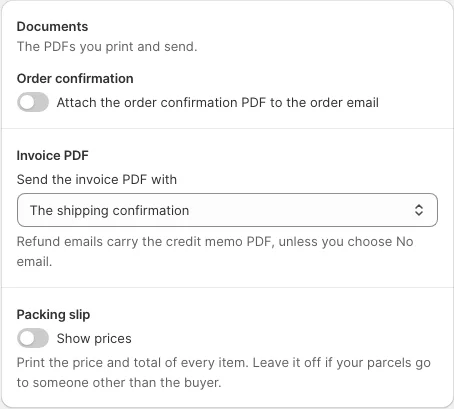
| Value | The invoice PDF goes with | The credit memo PDF |
|---|---|---|
shipment (default) | The shipping confirmation | On the refund email |
payment | "Payment received" | On the refund email |
none | No email; "Email invoice" is hidden | None |
- Each invoice goes out once. A shipping confirmation carries the order's invoices that no earlier email carried. With one invoice and two partial shipments, the PDF goes with the first shipment only. When Mollie (Klarna, Billie) makes an invoice per shipment, each shipment carries its own. A resend of a shipping confirmation carries the same PDFs again.
shipmentfalls back to "Payment received" for an order with nothing to ship, and for a store whose shipping confirmation is off in Settings > Customer emails. Otherwise no email would carry the invoice.- An order shipped before it was paid gets a shipping confirmation without a PDF. "Email invoice" on the order page sends the invoice later.
- "Mark as paid" and "Capture" send no email. "Email invoice" in the order's More actions (
light/orders/emailinvoice,Magento_Sales::email) sends "Payment received" with the PDF for each invoice that isn't canceled, whatever the setting, unless it isnone. - The order confirmation PDF rides on the order email when the owner switches on "Attach the order confirmation PDF to the order email" (
mrx_documents/order/attach, per channel, off by default). - A body says so with
{{depend mrx_has_attachment}}: Light's order, "Payment received" and shipping bodies print "Your invoice is attached as a PDF." or "Your order confirmation is attached as a PDF.". The refund email keeps Magento's body and has no such line. - Magento classic sends no PDF.
The table mrx_documents_invoice_mailed holds one row per invoice that went out as a PDF, with the shipment whose email carried it, or NULL for "Payment received". A row goes when its invoice is deleted. The table is internal.
How the PDF gets on the email. Each of Magento's sales emails goes out through a sender that builds its message with a SenderBuilder. Light gives seven senders a senderBuilderFactory that makes Mrx\Documents\Model\Email\Attachment\AttachingSenderBuilder: InvoiceSender and Invoice\Sender\EmailSender, ShipmentSender and Shipment\Sender\EmailSender, CreditmemoSender and Creditmemo\Sender\EmailSender, and OrderSender. The shipping pair, for example:
    <virtualType name="MrxDocumentsShipmentSenderBuilderFactory" type="Magento\Sales\Model\Order\Email\SenderBuilderFactory">
        <arguments>
            <argument name="instanceName" xsi:type="string">MrxDocumentsShipmentSenderBuilder</argument>
        </arguments>
    </virtualType>
    <type name="Magento\Sales\Model\Order\Email\Sender\ShipmentSender">
        <arguments>
            <argument name="senderBuilderFactory" xsi:type="object">MrxDocumentsShipmentSenderBuilderFactory</argument>
        </arguments>
    </type>
So every caller of those senders gets the PDFs: the admin, Light's Ship items and Refund, the checkout, cron with asynchronous sending, and the payment modules. Mollie's and Pay.'s own invoice settings keep working, because their invoice emails go through InvoiceSender. The BCC copy carries the same files; a separate "copy to" mail carries them too. Light's tracking update email doesn't go through a sales sender and carries no PDF.
The provider interfaces behind the builder, AttachmentProviderInterface and RecordsSendInterface, are internal in 0.1: only Light's own documents attach. If your module needs to attach its own document to a sales email, ask for it.
The storefront print. "Print invoice", "Print all invoices" and "Print refund" in My Account and in the guest order view open the same PDF the owner prints, inline in the browser, in the order's store language. An after plugin on the four print controllers swaps the print page for the PDF only when the stock controller answered with the page, so the stock check that the customer may see the order still decides. Another customer's invoice id gets the stock redirect. The setting doesn't hide the print: a customer can always fetch an invoice that exists. With Magento classic on, the stock print page comes back.
The return slip on the approval mail
The customer gets the return slip with the mail that tells them the return is approved, so they can pack the parcel straight away. The return's status decides which mail that is, at the moment the mail goes out:
| Carries the slip when | |
|---|---|
"Return status changed" (mrx_returns_email_customer_status_change) | The new status is approved |
"Return request received" (mrx_returns_email_customer_new) | The return is already approved, as it is when "Approve requests automatically" on Settings > Returns (rma/policy/auto_approve) is on |
| The mail to the shop about a new return | Never |
- The status decides. A return the owner creates in the admin gets the slip once it is approved, whatever the setting says, and so does a return that came in before the owner changed the setting.
- Each mail carries one slip,
Retourbon-<number>.pdfin Dutch, named in the return's store language. Later status mails ("in transit", "received", "resolved") carry none. - Both bodies print "Your return slip is attached. Print it and put it in the parcel." under
{{depend mrx_has_attachment}}. - "Return request received" tells a return that waits for the owner from one that is approved on arrival. It prints "We will review your request and get back to you as soon as possible." under
{{depend mrx_awaits_review}}and "We have approved your return." under{{depend mrx_approved}}. A theme that overridescustomer_new.htmlkeeps both blocks, or an approved return's mail still promises a review. - An owner who approves with "Send a notification to the customer" unticked sends no mail, so the customer gets no slip. "Print return slip" in the return's More menu still prints it, for the owner to send by hand.
- A slip that fails to render is logged, and the mail goes out without it. Magento classic sends no slip.
The return mails don't go through a sales sender. Returns has its own EmailSender, which replaces MageOS RMA's through a preference on MageOS\RMA\Api\Email\SenderInterface. It overrides upstream's sendRmaEmail() with the same steps and puts the PDF on the message between getTransport() and sendMessage(), with the class the sales builder uses:
            if ($slip !== null && !$this->messageAttacher->attach($transport, [$slip])) {
                // A mail transport module that replaces Magento's message type takes no file, while the body already
                // says the slip is attached.
                $this->logger->warning(
                    'Light Returns: the mail for return ' . $rma->getEntityId() . ' took no return slip'
                );
            }
            $transport->sendMessage();
MessageAttacher is internal, like the providers.
A client format
A format restyles every email and every PDF of the shops that pick it. It sets the type, the spacing and where the accent goes; the logo, the accent colour and the footer stay the owner's settings. An agency that gives its clients one house look ships it as a format in a module of its own.
A format is an item in the formats pool, in the global etc/di.xml, because mails render in the storefront, the admin, cron and the REST API. Acme_LightProof adds one:
<type name="Mrx\Documents\Model\Format\Formats">
    <arguments>
        <argument name="formats" xsi:type="array">
            <item name="acme" xsi:type="array">
                <item name="label" xsi:type="string" translate="true">Acme</item>
                <item name="description" xsi:type="string" translate="true">Rounded buttons and a tinted item table.</item>
                <item name="email_inline_css" xsi:type="string">Acme_LightProof::css/email-acme.css</item>
                <item name="sort_order" xsi:type="number">40</item>
                <item name="module" xsi:type="string">Acme_LightProof</item>
            </item>
        </argument>
    </arguments>
</type>
Prop
Type
The code becomes the class mrx-f-acme on the mail's wrapper table and on the PDF's body, so every rule in the format's files starts with it. A code is a plain identifier, a lower-case letter and then letters, digits or _ (2 to 32 characters); the pool skips any other. To change or remove one of Light's formats, use its key, as Changing Light for one shop shows.
The email file
email_inline_css restyles the email classes and uses the two tokens, with the rules of your own CSS: a token as a plain value, no {{var}} and no var().
Check the path in email_inline_css once in a mail catcher. A file Magento can't find strips the inline styles from every mail of every shop that picks the format, Light's own styles included.
.mrx-f-acme .header { border-bottom: 4px solid __MRX_ACCENT__; border-radius: 16px 16px 0 0; }
.mrx-f-acme .button .inner-wrapper td, .mrx-f-acme .button .inner-wrapper td a { border-radius: 999px; }
The header inlines it after Light's own file, so a rule of the same weight wins:
{{inlinecss file="Mrx_Documents::css/email-inline.css"}}
{{depend mrx_format_inline_css}}{{inlinecss file=$mrx_format_inline_css}}{{/depend}}
Style only the classes and tokens of the surface snapshot (its email-class and email-token lines). Light may rename any other class in a minor release, and your rule then styles nothing.
The PDF file
pdf_css names a frontend CSS file that Light puts after its base.css in every PDF. It restyles the doc-* classes and takes the same two tokens. Light's Bold format starts like this:
.mrx-f-bold .doc-letterhead { border-top: 4mm solid __MRX_ACCENT__; }
.mrx-f-bold .doc-letterhead td { padding-top: 5mm; }
.mrx-f-bold .doc-title { font-weight: 700; }
.mrx-f-bold .doc-items th { background: __MRX_ACCENT__; color: __MRX_ACCENT_TEXT__; border-bottom: 0; }- A format without
pdf_css, such as Acme's, prints its PDFs in Light's base look. - dompdf has no flexbox or grid. Lay a PDF out with tables, as
base.cssdoes. - dompdf reads files only from Light's module folder,
pub/mediaand its font cache, so a font file inside your module doesn't load. Use Inter, which Light declares in the weights 400, 500, 600 and 700, or a core font with a DejaVu face behind it, as Letter's headings do withTimes, 'DejaVu Serif', serif. A core font alone prints?for a letter such as the Ł of Łukasz. - A PDF is always light. A
prefers-color-schemerule inpdf_cssnever applies.
How an agency adjusts, light to heavy
Start at the top and go one step down only when the step above can't give the client what they ask for. Each step down leaves more for you to check at every Light upgrade.
- The settings screen. Settings > Emails & documents sets the format, the accent colour and the footer text per channel, and the footer text per language. The logo comes from Business details > Logo and branding, the company lines from Business details. You deploy nothing, and an upgrade keeps all of it.
- A client format. A module with one or two CSS files, as in A client format. The owner picks it on the same screen, and it keeps working across releases as long as it styles the classes and tokens of the snapshot.
- A theme override of one file. Copy one of Light's files into the store's frontend theme and change the copy:
app/design/frontend/<Vendor>/<theme>/Mrx_Documents/email/header.htmlfor the email header,app/design/frontend/<Vendor>/<theme>/Mrx_Documents/templates/documents/invoice.phtmlfor the invoice's body. Every store view on that theme gets the copy. From then on Light's fixes to that file skip the shop, so compare the two after each upgrade. A header copy keeps the stock nesting (table.wrapper > td.wrapper-inner > table.main > td.main-content) and both{{inlinecss}}lines, or the bodies and the format lose their styles. An invoice copy reads the keys of the invoice'sdata, which are internal. - Magento's advanced screens. A template saved in Marketing > Email Templates and picked in the configuration replaces Light's file for that scope. It gets no fixes, and no texts from Settings > Customer emails. Keep this for the one mail the steps above can't reach.
What stays in Magento's advanced screens
Light doesn't rebuild these screens. They work as in any Magento shop, and the link "Open in advanced view" on Settings > Emails & documents leads to Stores > Configuration > Sales > Emails and documents (Light), where "Magento classic" lives.
| Where | What it holds | With Light |
|---|---|---|
| Marketing > Email Templates | Raw template HTML, saved in the database | "Load Default Template" with Header loads Light's header, with or without a theme. A saved template counts only once a configuration path picks it |
| Content > Design > Configuration, per store view, Transactional Emails | The header and footer template, the email logo | "Header (Default)" and "Footer (Default)" are Light's. A header saved in the database wins and goes out with Light's footer; the doctor reports email_shell_config. A logo uploaded here wins over the store logo, in emails and in PDFs |
| Stores > Configuration > Sales > Sales Emails, per website or store view | Which template each mail uses | A database template picked for a scope replaces Light's body there and gets no texts. Saving texts in Settings > Customer emails sets that scope back to the standard template |
Stores > Configuration > Sales > PDF Print-outs (sales_pdf) and Sales > Sales > Invoice and Packing Slip Design (sales/identity) | The settings of Magento's own PDFs | They apply only while Magento classic is on. Light's PDFs take the logo and the company lines from the brand kit |
| Stores > Configuration > Customers > Customer Configuration > Address Templates > PDF | The address format of PDFs | Light's invoices, credit memos and order confirmations print their addresses with it |
| Shipping labels and the packaging PDF | The carrier's label PDFs and Pdf\Packaging | They stay Magento's and the carrier's |
| Admin and 2FA mails | Password resets and notices for staff, 2FA setup | They stay plain: their templates include no header, and Light styles none of them. The user invite is Light's own mail |
| Marketing > Newsletter Templates and Newsletter Queue | Newsletter campaigns | The merchant's own HTML; Light doesn't touch it. The subscription mails include the header, so they wear Light's look |
What the owner sees
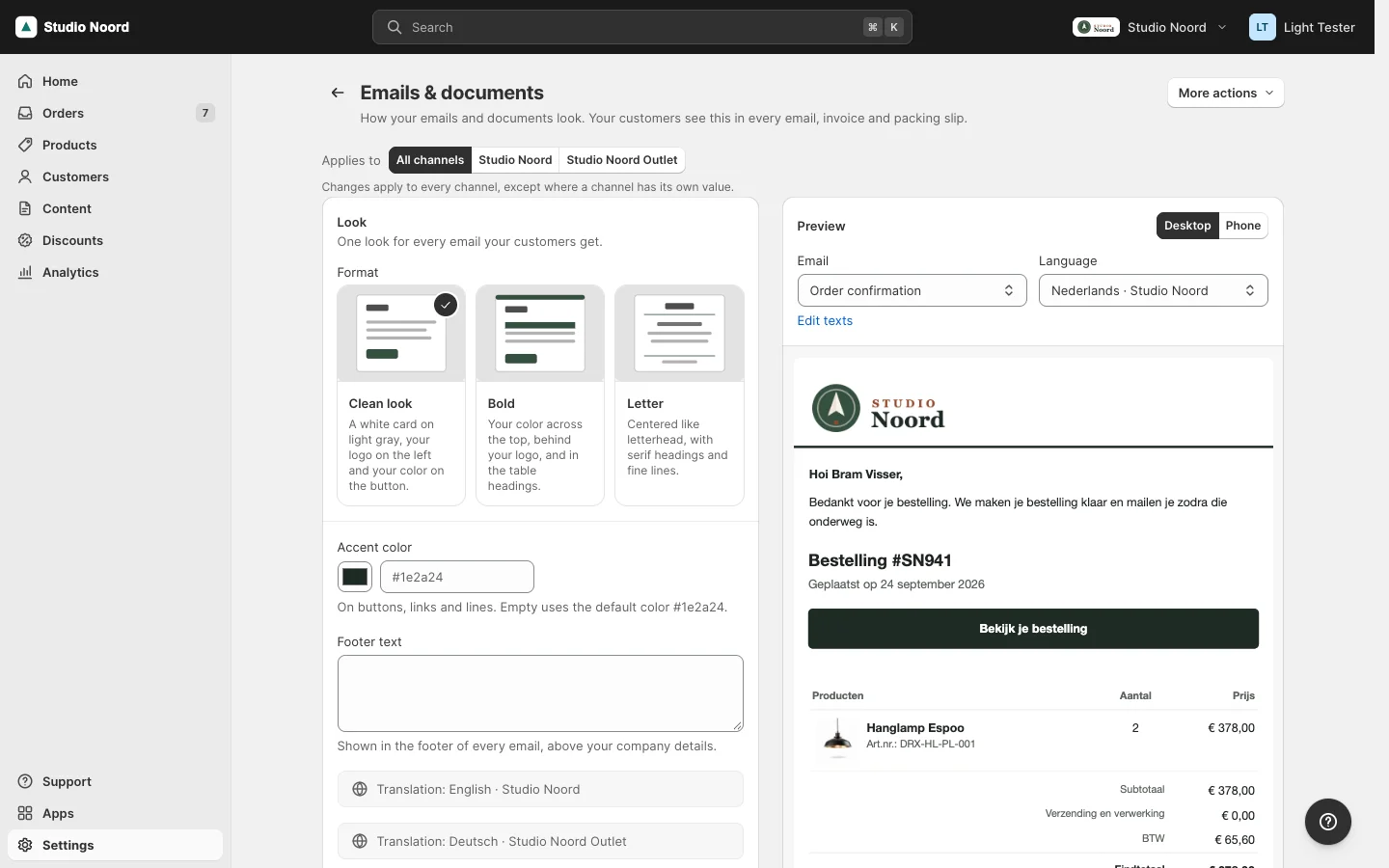
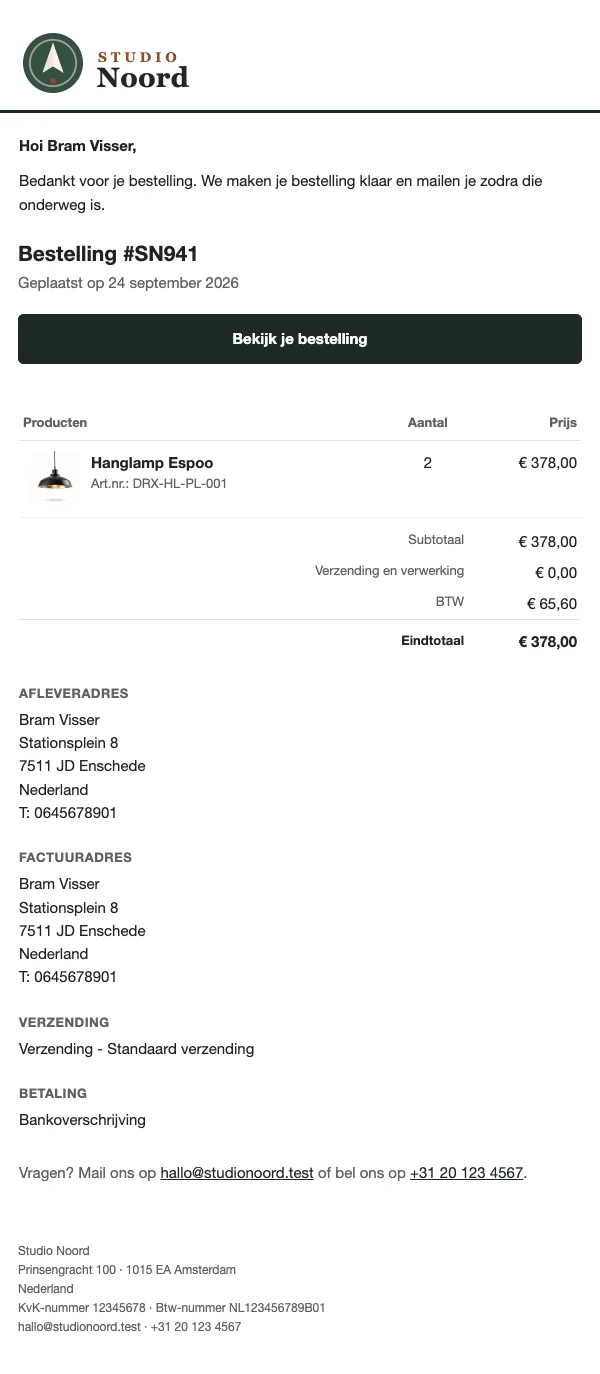
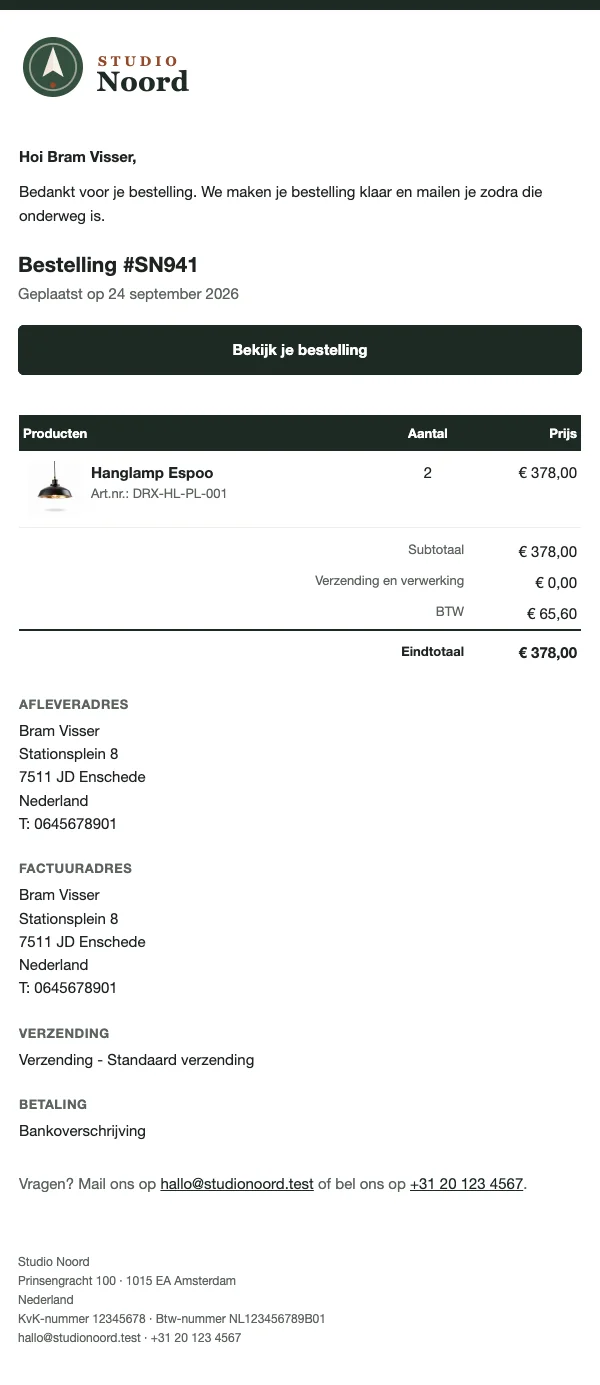
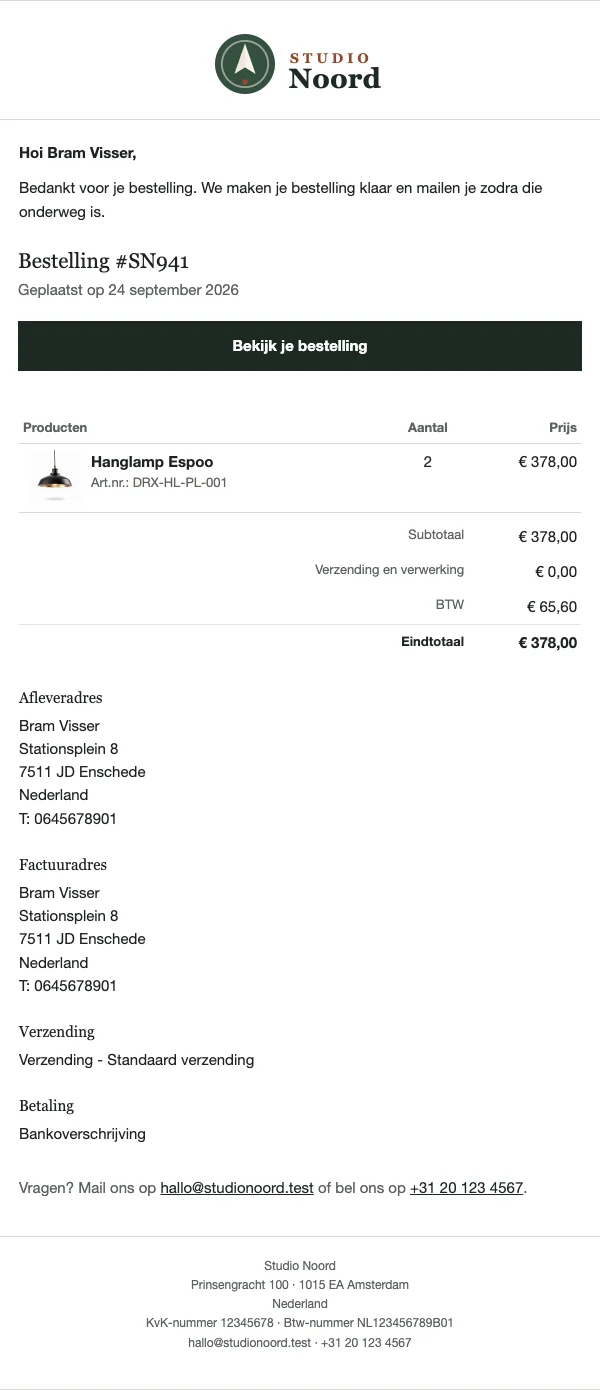
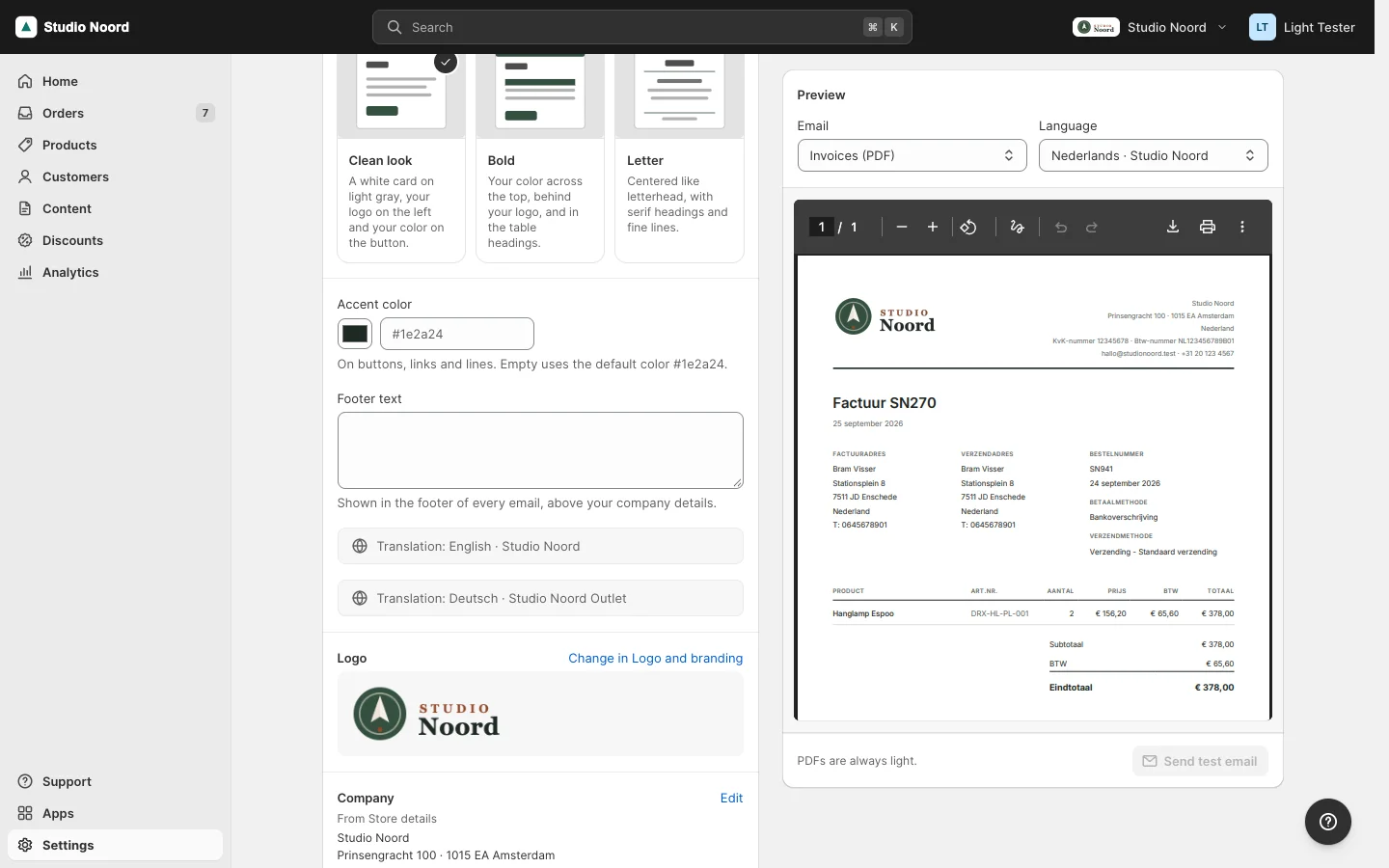
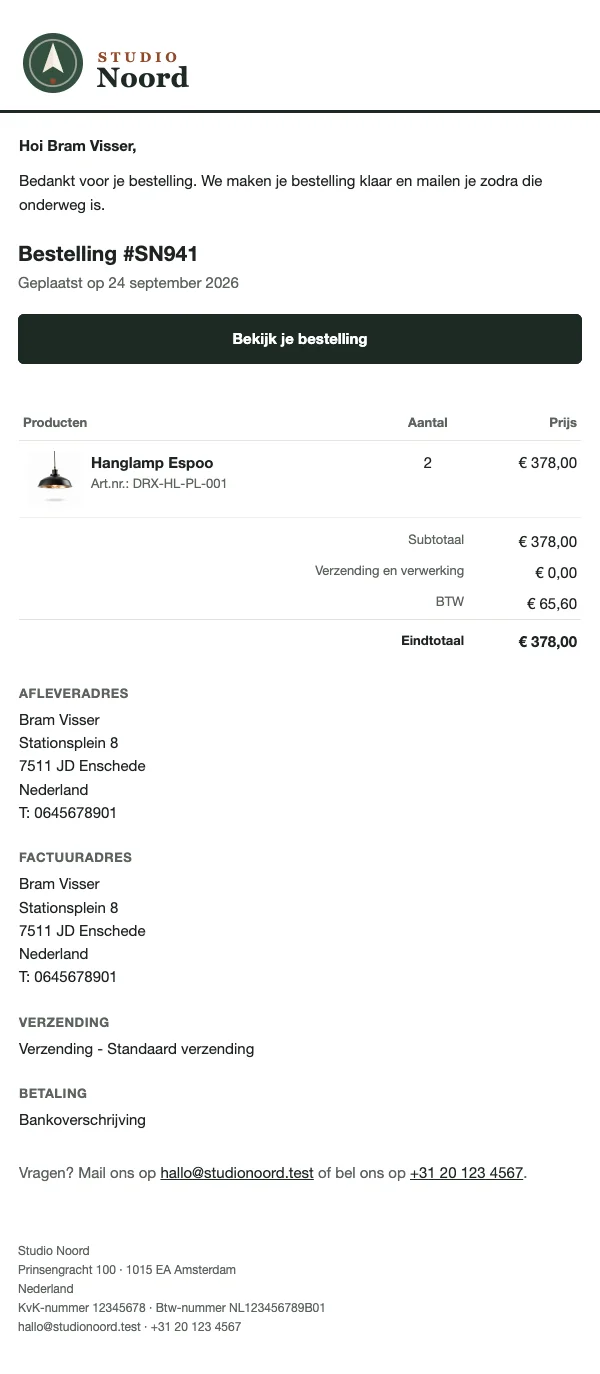
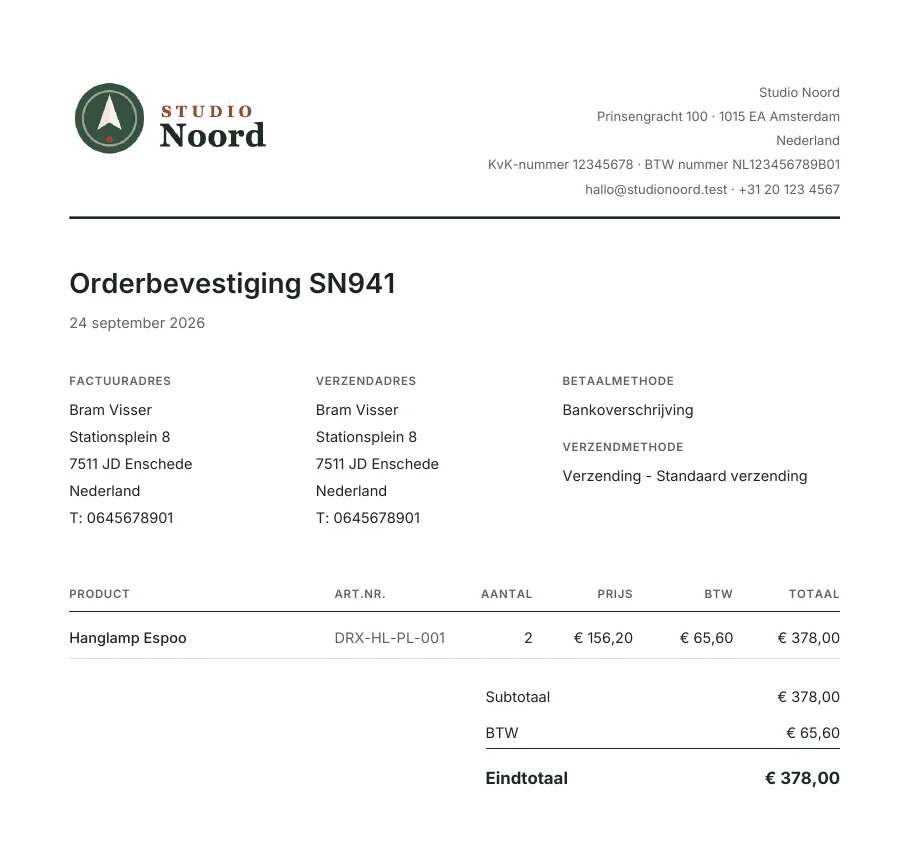
- Simple mode. Settings > Emails & documents: the format cards (yours among them), the accent colour and the footer text, each per channel, the footer text per language, a preview on desktop or phone, and a test email to the admin's own address. The preview picker lists every customer email by group: Orders, Account, Returns, then Other modules, which holds the pool's emails without a
groupand every other module'sfrontendHTML template for customers, rendered with the newest order's variables. "Edit texts" next to the picker opens the email in Settings > Customer emails. When the store has no invoice or credit memo yet, "Payment received" and "Refund confirmation" show an unsaved example made from the newest order. The preview's Documents group lists the types of thedocumentspool that can build a sample and that the admin may see, "Order confirmations (PDF)", "Invoices (PDF)", "Credit memos (PDF)" and "Packing slips (PDF)" for Light's own, each as a sample in the look on screen: the store view's newest document of that type, or, when it has none, an unsaved example built from an order (an invoice from an order that waits for one, a credit memo that refunds a paid order in full). The order confirmation shows the newest order that isn't canceled, the packing slip the newest order with something left to ship. Only Light's own types build a sample, because the interface for it is internal, so a type you register in the pool prints and downloads like the others but doesn't show in the picker. The Documents card holds three controls, each per channel: Order confirmation, "Attach the order confirmation PDF to the order email" (off); Invoice PDF, "Send the invoice PDF with" (the shipping confirmation); Packing slip, "Show prices" (off). On an order, More holds "Print packing slip" unless the order is canceled, "Print order", "Print invoice", "Email invoice" once the order has an invoice and, once the order has a refund, "Print credit memo"; a shipment's own menu holds "Print packing slip" for that parcel. Each downloads the PDF. The orders list's bulk actions include "Print packing slips", "Print picklist" and "Print order confirmations". On a return, More holds "Print return slip" from approval onward. - Advanced mode. Stores > Configuration > Sales > Emails and documents (Light) holds the same fields and "Magento classic", which gives emails and PDFs Magento's own look back. The stock print buttons and mass actions, "Print All" included, print Light's PDFs.
ACL
Mrx_Documents::documents guards the settings screen, its preview and its test email. The preview and the test of an order email, and of any email under Other modules that isn't in the emails pool, also need Magento_Sales::sales_order, and each PDF in the picker needs the type's own getAclResource(): Magento_Sales::sales_invoice for the invoice, Magento_Sales::sales_creditmemo for the credit memo. An example built from an order, when the store has no invoice or credit memo yet, also needs Magento_Sales::actions_view, because it prints that order's customer; without it the preview says there is nothing to show yet. A format has no resource of its own. light/documents/download asks for the type's getAclResource(): Magento_Sales::sales_invoice for invoice, Magento_Sales::sales_creditmemo for creditmemo, and Magento_Sales::actions_view for order, the packing slips and picklist, as do the bulk routes light/orders/packingslips, light/orders/picklist and light/orders/confirmations; return_slip asks for MageOS_RMA::rma_manage, the resource of the returns screens. View email and its route, light/documents/sentemail, need Magento_Sales::actions_view, the resource of the order page; the route answers a copy only for the order it belongs to.
Check it
bin/magento mrx:light:doctor --module=<your module>:email_shell(a body without the includes),email_inline_style(more than 3styleattributes),wrong_area(an item ofemails,formats,documentsor another global pool inetc/adminhtml/di.xml),pdf_inner_plugin(a plugin or preference on the stock PDF drawing code), and for the shopemail_shell_config(a header or footer saved in the database or pointing at a template that doesn't exist) andemail_css(a missing or stale email CSS file).- Send the mail and open it in Mailpit, in each format and in dark mode. Its Text tab shows the plain-text part.
- Send your mail about an order, open the order and click View email on its line.
SELECT subject, UNCOMPRESS(html_body) FROM mrx_documents_sent_email WHERE order_id = <id>shows what was kept. - Print one document and a batch from two store views, in each format.
pdftotext -layout <file> -shows the text;pdffonts <file>should list Inter, and DejaVu only where a character needs it.
Pitfalls
- A theme that overrides Magento's
header.htmlandfooter.htmlunderMagento_Emaildoesn't change a Light mail: the shell ids are mapped to Light's own before the theme's file is looked up. Style the email classes in a format instead. - A theme that overrides
documents/page.phtmlreads the internalBrandclass, which may change in a minor release. - After an upgrade the deployed copies of the email CSS are old until
setup:static-content:deployruns; the doctor reportsemail_css. - Replacing the
invoice,creditmemoorpacking_slip_shipmentitem with a type of your own switches Light's PDF off for the stockgetPdf()callers: they get the stock PDF back, because the hook also needs to print the invoices, credit memos or shipments it was handed rather than ids. To change the invoice's look, overrideMrx_Documents::documents/invoice.phtmlin the store's theme. - Another module that sets its own
senderBuilderFactoryon one of the seven sales senders, such as a PDF-attachment extension, replaces Light's: the module that loads last wins, and the other's PDFs stop without an error. Keep one of the two. - A mail transport module that swaps Magento's
EmailMessagefor a message of its own takes no return slip, while the body still says "Your return slip is attached.". The log gets a warning:Light Returns: the mail for return 140 took no return slip. - Another module with its own preference for
MageOS\RMA\Api\Email\SenderInterfacereplaces Returns' sender: the return slip, the store's contact details and the owner's message leave the return mails without an error. Keep one of the two. - Two customer mails about one order sent within 10 seconds of each other, whose history rows are written in the other order, swap their View email links. Write each row straight after its own send.
- dompdf reads TrueType fonts only. A WOFF2 file in a
@font-facefalls back to DejaVu Sans without a warning, as does a weight you didn't declare. - The first PDF fills the font cache in
var/mrx_documents/fonts, and dompdf rewrites a file there for every new font. The PHP-FPM user must own it: a PDF printed from a root shell leaves files the shop can't rewrite.
Last updated on