Channels and store views
Settings per channel and store view, and counters that follow the channel filter.
A channel is a website with its store views and languages. Light lets a merchant set a value once for all channels, or per channel and per language. This recipe covers settings per channel and store view, and counters per channel. The full channel contract, with the language switcher and the Channels card, is Design system, section 16.
When to use it
- A setting differs per channel or language: a storefront title, a sender address.
- A count the merchant filters by channel on Home.
- Keep the everyday value at default scope and offer per-channel values only where shops differ (Built for Light, rule 4).
Steps
1. Scope flags in system.xml
A settings page from your system.xml follows its scope flags. A field with showInWebsite gets "Applies to" (all channels, or one), and a field with showInStore gets one input per store view under the main input. The golden example's title field has all three:
showInDefault="1" showInWebsite="1" showInStore="1"The pilot names such a field in simple mode. On a shop whose main language is Dutch the page offers one input per other language, and an English value saved on the Light page shows in the stock section under the English store view's scope:
<item name="welcome" xsi:type="string">general/welcome_message</item>Under All channels, a channel whose default language isn't the shop's main language (an English channel on a Dutch shop) gets an input for that language too, or its customers would read the Dutch text. In that channel itself the main input is its own language, so no second input shows there. That input shows the channel's value, while a translation saved under All channels wins on the storefront, so in the channel the field names it: "Changed for English in its translation", with "Remove the English value".
The page posts store-view values as i18n[<storeId>][<group>/<field>]. An empty store-view input removes the store-view value, so the store view falls back to its channel.
2. Saving per scope in your own code
A settings page written as a PHP class saves through ScopedConfigWriterInterface, which writes default, website and store values in one call:
public function save(array $values, ?int $websiteId = null, ?int $storeId = null): array;For a website, a value equal to what the channel reads now is not written, so a field the merchant left alone keeps following all channels. Any other value becomes the channel's own, also a value equal to the all-channels one: the channel keeps it when the all-channels value changes later. Pass null to remove the channel's own value, which is what "Use the all-channels value" posts (mrx_use_default[]). A PHP bool counts as a switch: false equals '0', '' and a path with no value at all (no row and no config.xml default), so a form that posts a switch back as it showed writes nothing; pass the string '0' when you need the row itself.
On a shop with one channel (one website), all channels is that channel. Many existing stores keep settings at their only website, so reading for all channels gives the website's value when it has one, which is what the storefront uses, and a save with $websiteId = null writes default scope and removes the website's row for every path in $values, also one whose value didn't change. A masked secret (******) is not written, so its website row stays. With two or more channels, a save for all channels leaves the channel rows alone.
A page class that implements ChannelScopedInterface gets "Applies to" on the Settings page, like the core pages in Mrx\Settings\Model\Page. Its form posts the channel as channel; when that channel no longer exists (removed while a tab stayed open), light/settings/save answers 422 "This channel no longer exists. Reload the page." before your page's save() runs, so its values never land at all channels.
3. Counters per channel
A to-do counter that implements ChannelAwareCounterInterface counts only the channel the merchant filters Home by:
public function getCount(?Channel $channel = null): int;A plain CounterInterface, and a to-do with badge, count the whole shop.
4. Two forms of address
Some languages address a customer two ways: Dutch "je" and "u", German "du" and "Sie". The pool locales (an argument of Mrx\Light\Model\Locale\FormOfAddress, global area) lists the languages Light knows two forms for, keyed by locale. default names the form a store view uses until the merchant picks one, and informal and formal hold the pronoun each form's label starts with:
<item name="de_DE" xsi:type="array">
    <item name="default" xsi:type="string">formal</item>
    <item name="informal" xsi:type="string">Du</item>
    <item name="formal" xsi:type="string">Sie</item>
</item>
A locale without an item has one form, and its store views get no setting. A pack that ships nl_BE.formal.csv adds an nl_BE item with the same three keys to locales in its own di.xml, with no code.
For the languages in the pool, Settings > Channels shows an "Addressing" column per language, and the choice is stored per store view in mrx_light/locale/form_of_address. The column hides when no language of the channel has two forms.
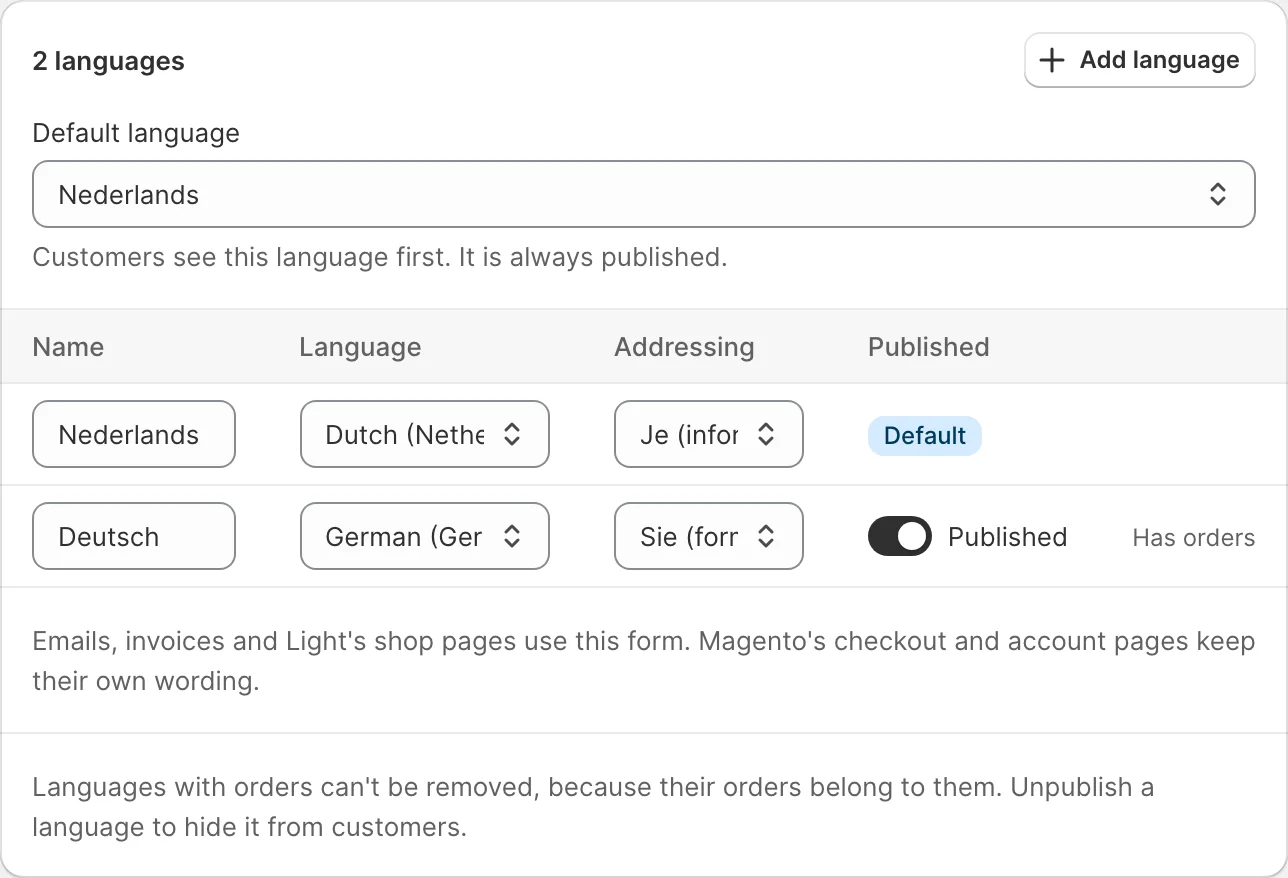
In the stock admin the same setting is a store-view field under Stores > Configuration > General > Locale Options, next to Locale. Ask for it through the @api interface:
public function forStore(int $storeId): ?string;It returns informal, formal, or null for a store view whose language has one form. Customer text follows it: next to i18n/<locale>.csv, a module ships i18n/<locale>.informal.csv or <locale>.formal.csv with the rows that differ, and Light lays the chosen file over the language pack for the storefront, customer emails, PDFs and the messages of the REST and GraphQL APIs. Give every customer phrase a row in both forms, as Light's own modules do. Admin text stays informal, and a text the merchant stores in config can't follow the setting, so write it without a pronoun. A theme's own i18n/<locale>.csv loads after the variant files and wins, and the storefront's JS dictionary holds the base rows only, so keep customer phrases that a script shows free of pronouns.
"About your order #%1","Over uw bestelling #%1"
"Dear %name,","Beste %name,"
What the admin sees
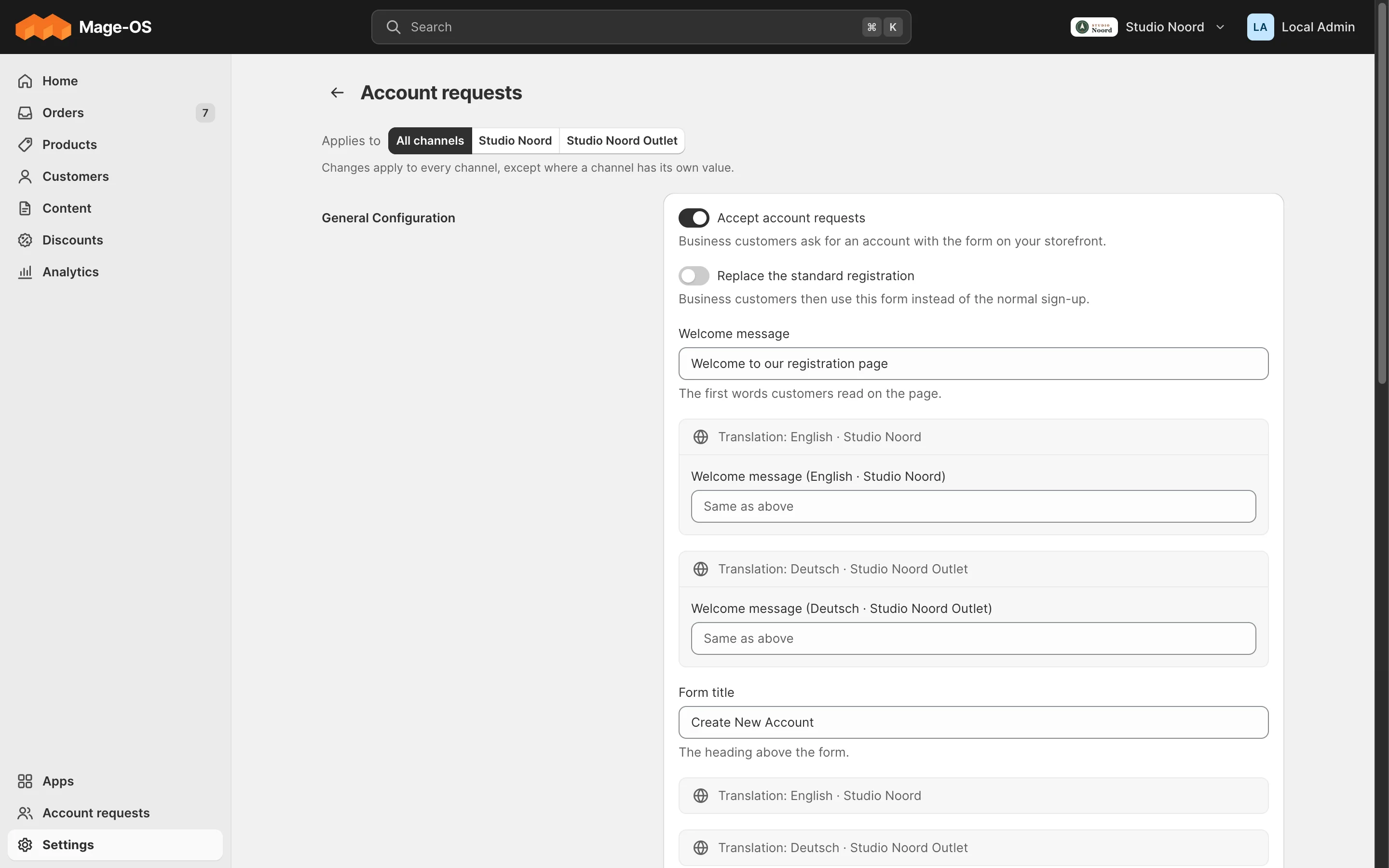
- Simple mode. "Applies to" above channel-scoped fields, one input per language under store-view fields, and Home counts that follow the channel filter.
- Advanced mode. The stock scope switcher.
Store-view values from the advanced view
Light's settings have two levels, all channels and one channel. A merchant can still give a store view its own value
in the advanced view, for the sender address, the GA4 id or guest checkout, and Magento uses it on the storefront for
that language, even for a field without showInStore. Light doesn't edit such values, it names them:
- Under a field with a
path(Fieldswith thepathoption, and core's pages), every store view with its own value gets "Changed for Deutsch in the advanced view" and a "Remove the Deutsch value" button. In a channel the note lists that channel's languages; under All channels every language, with the channel's name ("Deutsch · Outlet"); on a shop with one channel it shows too. - The button adds
mrx_store_reset[]=<store id>:<path>to the form.light/settings/saveremoves that store-view row after your page'ssave()ran, so the language follows the page's value again. It removes only a row that exists, of a store view in the posted channel, of a setting that counts. Discard takes the mark back. - A switch that writes several settings names all of them: Taxes' "Prices include tax" also shows a store view's own
value of any tax display setting it writes. One note per language; its button lists every
<store id>:<path>of that language, space-separated indata-mrx-store-reset, and posts onemrx_store_reset[]per value. - Business details' branding card names a store view's own logo, browser icon or email logo the same way, under each file.
bin/magento mrx:light:doctorlists every such row asstore_override. Its fix names the settings page that shows the setting, or only the advanced view for a setting no Light page shows. A module inapp/code/Mrxwhose page notes its own paths declares them in thepagesargument ofMrx\Settings\Model\Config\ShownPaths(page code =>labelandpaths, a "*" matching any part of a path); schema pages need nothing, their fields count. Other modules can't: the class is no@api, so their rows point to the advanced view, which always works. A payment provider withown_sectionin thepayment_providerspool is the exception: a row of its methods (payment/<prefix>...) names its settings on Settings > Payments and the advanced view, without promising a remove button there.
A setting counts when its system.xml field can differ per website, or it is one of the logos Light edits per channel.
Texts Light keeps per language itself don't count: payment and carrier titles, names and instructions, opening hours,
the welcome text, the locale and form of address, email templates and texts, legal page links, the home, 404 and
cookie pages, and the documents footer. Neither do the fields a schema page translates. The exception is a channel's
default language, in that channel: a row of it wins over the field the channel shows, so the field names it there, on
schema pages and under the texts core's pages show with Translations inputs (payment names and instructions, the
pickup name, opening hours, the welcome text, the documents footer). A translation written under All channels reads
"Changed for English in its translation" on an English channel; a row of a language that has no translation input
there (its locale is the main language's) reads "Changed for Nederlands in the advanced view". A module in
app/code/Mrx whose page shows a text with Translations inputs and a field path adds the path to the
translatedTexts argument of Mrx\Settings\Model\Config\StoreOverrides (exact paths; no @api type, so other
modules leave path off such a control). ChannelConfig::getStoreOverrides() reads the rows; getOverrides() still
lists channels only.
Legal pages across channels
Legal pages are kept per language, not per channel: the Dutch privacy policy serves every channel that sells in Dutch.
Each of those store views reads the same link, so the page has to be visible in all of them. When Settings > Legal
pages is saved under All channels by an admin who may save pages (Magento_Cms::save), Light adds the missing store
views of a linked page's language to the page, for every link on the screen, changed or not. A store view the page
can't be saved in (another page uses its URL key there) refuses a changed link and is skipped for an unchanged one. It never spreads a page into another language (that link is refused) and never publishes or
hides a page. bin/magento mrx:light:doctor lists a link that a store view of its language still can't open as
legal_page_hidden.
Two store groups in one website
Light hides store groups: a website is a channel. A second store group in a website, with its own root category and store views (a "Kids" shop beside the main one), is a second menu of that channel, not a channel of its own:
ChannelProvider::getChannelsByRootCategory()returns the channel for the root of any of its store groups. The channel'srootCategoryIdstays its own menu's, the root of the website's default group, and so does its default language.Channel::$languagesholds the store views of every group of the website.- Products > Categories lists the second root under the channel, with the channel's filter. A category below it offers only that group's store views as languages, and a category of the channel's own menu leaves them out.
- Content > Menu has a tab per menu of the channel ("Kids menu"); the tab's address names the root,
light/menu/index/channel/<channel id>/root/<root id>, and its saves postrootnext tochannel. A save for a root that isn't a menu of the posted channel is refused. - Settings > Channels lists each menu's languages under the channel, and the channel's default language is one of its own menu's. Which menus a channel has is set in the advanced view.
- Two groups of one website on the same root category are one menu: its languages are both groups' store views, and it is named after the channel once.
A module that works per root category asks getChannelsByRootCategory(); one that needs a menu's own languages asks
the store group (StoreManagerInterface::getGroup() and its store ids), as Light's internal ChannelMenus does.
ACL
Scope doesn't change access: the section's ACL resource guards every scope.
Check it
tests/playwright/settings-schema.spec.tssaves store-view values.tests/playwright/channels-foundation.spec.tssaves the Addressing column and reads the rows back.tests/playwright/store-overrides.spec.tsseeds a store-view value, finds the note and the doctor line, and removes it.tests/playwright/multiscope/legal-per-channel.spec.tslinks a Dutch page shown in one channel, finds the doctor line, saves, and opens the page in the outlet's Dutch store view.tests/playwright/multiscope/default-language.spec.tsadds an English channel to the Dutch shop and translates the opening hours for it under All channels.tests/playwright/multiscope/catalog-overrides.spec.tsseeds a category's own "Show in menu" and "Visible" values per store view, finds them under the switches, and turns the switch off: "Cancel" writes nothing, the confirmed save removes only the own value that differs from the new one.tests/playwright/multiscope/store-groups.spec.tsadds a second store group to the main website and finds its menu in the category editor, the menu editor and Settings > Channels, each with that group's languages only.bin/magento config:show --scope=stores --scope-code=<store> <path>shows what was saved.
Pitfalls
- A single-channel shop never shows "Applies to"; test with two channels. Test a one-website shop too when your page reads or writes settings an existing store may keep at its website: the page shows the website value and a save moves it to default scope.
- A store-view value for a field without
showInStorecan't be set in the stock form, but Magento still reads a row that is there (a data patch, an import). The settings page names it like any store-view value.
Last updated on