A settings page from your system.xml
A Light settings page drawn from your own system.xml, with only the everyday fields in simple mode.
Light draws a settings page from your module's own system.xml: no controller, no template. In simple mode it shows the few fields you name, in plain words; the rest stays in the stock section.
When to use it
- Your module has settings a merchant changes in daily work: whether a feature is on, a sender address, a title on the storefront.
- Name only the everyday fields in
simple, one by one. Everything else stays behind the Advanced section at the end of the page (Built for Light, rule 4). - Fields on core settings pages are not supported. Make your own page and, when it belongs in daily selling, point a Settings card at it.
How the page is drawn and saved
Steps
All items go in etc/adminhtml/di.xml, except the emails of step 6, which go in etc/di.xml.
1. The page
A Page\Pool array item (pool settings_pages) names the stock section and the fields simple mode shows. The pattern-B example's page, written by the scaffold:
<type name="Mrx\Settings\Model\Page\Pool">The pilot names every field one by one; there is no wildcard, so a new field in system.xml never shows up in simple mode by accident:
<item name="seo_title" xsi:type="string">seo/meta_title</item>
<item name="seo_description" xsi:type="string">seo/meta_description</item>
advanced lists the settings the merchant should be able to read on the page but only changes in the advanced view. They show as read-only rows in the Advanced section (step 7):
<item name="advanced" xsi:type="array">
    <item name="registration_url" xsi:type="string">general/registration_url</item>
    <item name="success_url" xsi:type="string">general/success_url</item>
    <item name="terms_url" xsi:type="string">general/terms_and_conditions_url</item>
    <item name="form_fields" xsi:type="string">form_fields/enabled</item>
</item>
labels and notes replace the stock labels and comments with warm words, keyed by <group>/<field>:
<item name="general/enabled" xsi:type="string" translate="true">Accept account requests</item>The keys of a page item:
Prop
Type
The page is reached at light/settings/app/page/<code>, from the app's card and from Settings > Apps.
2. Send the stock section to the page
A ConfigSections item (pool config_sections) sends the stock section adminhtml/system_config/edit/section/<section> to your page in simple mode.
3. Store-view fields
A field with showInStore in system.xml gets one input per store view under the main input, so the merchant sets a Dutch and a German text on the same page. An empty store-view input removes the store-view value. Channels and store views has the details.
4. Validate across fields
A validator on the page item names a class that implements SettingsValidatorInterface. It gets every posted value and returns the errors per field, before anything is saved:
public function validate(array $values, ?int $websiteId): array;The validate classes of system.xml fields run too; the doctor warns with validate_class about one Light can't run.
5. A Settings card, only for daily selling settings
The page is always reached from the app's card and from Settings > Apps. A card on the Settings index (pool settings_cards) is optional: one per module, only for settings the merchant changes while selling. A card with only page gets its URL from the page, takes module like any item, and its label and description are translated. The Settings index groups cards in sections (pool settings_groups: store, selling, legal, users, advanced).
6. Customer emails
A module that sends emails adds rows to Settings > Customer emails (pool emails), in the global etc/di.xml: the texts the merchant saves are put into the mail wherever it renders, in checkout, cron and the REST API as well as in the admin. Returns adds its rows with the RMA resource and module, so they show only to admins who may manage returns, and only while RMA is on:
<item name="locked" xsi:type="boolean">true</item>
<item name="resource" xsi:type="string">MageOS_RMA::config</item>
<item name="module" xsi:type="string">MageOS_RMA</item>
locked keeps an email the shop must send switched on. Without resource a row needs the Customer emails page's resource; a row the admin may not change shows read-only and is skipped on save. note explains what the merchant can change in the template:
<item name="note" xsi:type="string" translate="true">The subject and the text at the top of the email. The canceled items below it are filled in for each order.</item>7. The Advanced section
The page ends with the Advanced section: "Advanced" and "Settings you rarely need. You can only change them in the advanced view." on the left; on the right a card with the rows of advanced, the line "N more settings are in the advanced view." and the button "Edit these settings in the advanced view". The button opens the stock section, and the banner of the advanced view leads back to your page: "Back to" followed by the label of the first card in the settings index that shows the page, such as "Back to Returns". You declare nothing to get it: without advanced the card holds the line and the button, and a page that leaves no setting out has no section.
- Each entry is a
group/fieldof the section, one by one, likesimple. The label is the field'slabelsentry, else itssystem.xmllabel. - The value reads as the admin would read it: the option label of a select or multiselect, Yes or No for a switch,
******for a secret (anobscureorpasswordfield, or one whosebackend_modelis Encrypted), the stored text and units as stored (whitespace collapsed, cut at 120 characters), "Not set" when empty. The line under the rows counts only the settings the rows don't show. - A field that is already in
simple, isn't insystem.xml, holds no value (a note), stores a list (ArraySerialized) or comes after the sixth row is left out, and the doctor says why.
A page with its own template (a PHP class page) renders the same section and passes its own rows, as Settings > Returns does:
<?= /* @noEscape */ $block->renderPartial('Mrx_Settings::advanced-section.phtml', [
    'rows' => $viewModel->getAdvanced($scope),
    'url' => $viewModel->getAdvancedUrl($scope->getChannelId()),
]) ?>
AdvancedSection::getUrl() gives the URL of a stock section, and getNote() the line with the count. Pages that aren't settings pages keep the AdvancedHint block for a single "Only available in the advanced view" line, as the kit page does:
<block class="Mrx\Light\Block\AdvancedHint" name="mrx.kit.advanced.hint" as="advanced_hint">A page written as a PHP class still works for a page system.xml can't describe: its controller extends Mrx\Settings\Controller\Adminhtml\Settings\AbstractSettingsPage and sets PAGE_CODE, it is served at light/settings/<code>, its Page\Pool item is a class that implements Mrx\Settings\Api\PageInterface, and the page saves through light/settings/save with that code. A page that stores a cleaned-up value ("nl 1234.56.789.b01" saved as "NL123456789B01") also implements Mrx\Settings\Api\NormalizesInputInterface, so the form shows what was saved. A page whose save changes more than its own fields (channel notes, a name in the header) implements Mrx\Settings\Api\ReloadsAfterSaveInterface, and the form reloads after saving. Content under any Light settings page goes in the container mrx.settings.after (handle mrx_settings_page).
What a save cleans
Light refreshes the stored config after every save; it no longer cleans the whole config cache type. Return full_page only when this save changed something every storefront page shows (getCacheTypes() is called after save() on the same object, so you can decide per save): it empties the whole page cache, Varnish included. For output on some pages, clean their tags instead (clean_cache_by_tags, as Magento's own entity saves do). Return config if your module caches data derived from config under the config cache type. A schema page names the same types in cache_types.
Tracking codes are in every page's head, so Light's Tracking page decides like this:
        $changed = $this->scopedConfig->save($values, $channelId, $data);
        $this->reload = $channelId !== null && $changed !== [];
        // Every storefront page carries the codes in its head.
        $this->cacheTypes = $changed !== [] ? ['full_page', 'block_html'] : [];
Country rules
A country module tells Business details and Shipping how its country writes the business registration number, the tax ID and the postcode. It adds one item to the pool country_rules of Mrx\Settings\Model\Country\CountryRules, keyed by the ISO country code, in etc/di.xml (global area). The Netherlands item of Light for the Netherlands (Mrx_CountryNl) is the example:
<item name="NL" xsi:type="array">
    <item name="business_id" xsi:type="array">
        <item name="label" xsi:type="string" translate="true">KvK number</item>
        <item name="placeholder" xsi:type="string">12345678</item>
        <item name="pattern" xsi:type="string">^\d{8}$</item>
        <item name="message" xsi:type="string" translate="true">A KvK number has 8 digits.</item>
        <item name="numeric" xsi:type="boolean">true</item>
        <item name="invoice_labels" xsi:type="array">
            <item name="en" xsi:type="string">Chamber of Commerce</item>
            <item name="nl" xsi:type="string">KvK-nummer</item>
            <item name="de" xsi:type="string">KvK-Nummer</item>
        </item>
    </item>
    <item name="tax_id" xsi:type="array">
        <item name="label" xsi:type="string" translate="true">VAT number</item>
        <item name="placeholder" xsi:type="string">NL123456789B01</item>
        <item name="pattern" xsi:type="string">^NL\d{9}B\d{2}$</item>
        <item name="message" xsi:type="string" translate="true">Enter a Dutch VAT number like NL123456789B01.</item>
        <item name="invoice_labels" xsi:type="array">
            <item name="en" xsi:type="string">VAT number</item>
            <item name="nl" xsi:type="string">Btw-nummer</item>
            <item name="de" xsi:type="string">USt-IdNr.</item>
        </item>
    </item>
    <item name="postcode" xsi:type="array">
        <item name="match" xsi:type="string">^(\d{4})\s*([A-Za-z]{2})$</item>
        <item name="format" xsi:type="string">$1 $2</item>
        <item name="pattern" xsi:type="string">^[1-9]\d{3} [A-Z]{2}$</item>
        <item name="message" xsi:type="string" translate="true">Enter a Dutch postcode like 1013 AB.</item>
    </item>
</item>business_idandtax_idtakelabel,placeholder(the example),patternandmessage(shown when the value doesn't match),numeric(keep digits only) andinvoice_labels(the label on the invoice address that Business details writes for Magento's own PDFs and on the legal page variables, by languageen,nlorde). Light's own email and PDF footer (Mrx_Documents) doesn't readinvoice_labels: it prints the group'slabel, translated through your module's CSVs in the language of the store view.postcodetakesmatchandformat($1 $2rewrites whatmatchcaptured, in capitals),patternandmessage.- Leave out the keys a group doesn't need. A pattern the PCRE engine refuses counts as no check.
- A country without an item gets core's labels "Tax ID" and "Business registration number", no example and no check. In Magento's EU country list the tax ID also gets the check every EU VAT number passes: two letters, then up to 13 letters or digits.
- Write texts in English with
translate="true"and add the rows to your module's CSV.
Country wording
Core's English names no country. A sentence that a country words differently has one neutral English phrase in core, and the country module gives the shop's own wording back through its CSVs. Take "Printed on invoices and refunds, together with your tax ID and business registration number." Core's Dutch row is neutral. Mrx_CountryNl ships the Dutch wording of the Netherlands under the same English key:
"Printed on invoices and refunds, together with your tax ID and business registration number.","Staat op facturen en creditfacturen, samen met je btw- en KvK-nummer."An English admin on a Dutch shop reads the old English from the pack's en_US.csv:
"Printed on invoices and refunds, together with your tax ID and business registration number.","Printed on invoices and refunds, together with your VAT and KvK numbers."- Magento merges module CSVs in module order, and a later module's row wins. The pack lists every core module whose rows it overrides in its
<sequence>(Ship it as a pack). Without that line the core row wins and the pack's wording doesn't show. - A tier of CSVs (core, or one pack) holds one translation per phrase. An override by a pack in the same locale is not a conflict; two modules of the same tier that disagree are, and the consistency test reports it.
- Installed language packages load after every module CSV, so they win over both.
community-engineering/language-nl_nltranslatesTaxas "BTW", for example. Before you give your module a new English phrase, check that no installed package translates it (php tests/i18n/dictionary.php <locale> --packsprints what they translate). If one does, pick a phrase only your module uses. A phrase you can't change, such as one from a module you don't own, goes into the poolprefer_phraseswith the module whose row should win (Troubleshooting). - A row never renames a phrase that Magento prints too. A pack row
"Tax","VAT"would change the storefront cart as well. The one exception is British spelling in anen_GB.csv("Color","Colour").
Cards on the Taxes, Business details and Payments pages
Four containers take cards from other modules: mrx.settings.taxes.preset (above the Taxes form, for a country's ready-made tax setup), mrx.settings.taxes.cross_border (cards on sales abroad), mrx.settings.business.registration (Business details, below the tax ID and registration number) and mrx.settings.payments.providers (in the Online payments band, after the provider cards and outside the Payments form). They hold display cards. The page saves only its own fields, so a card that needs input posts to its own controller and sets aclResource. On Taxes, a button with data-mrx-tax-action="<url>" posts to that URL and reloads the page with the answer's message; Mrx_Settings/js/taxes wires it.
Wording on core cards
Core cards take their country wording from block arguments, so a country module changes them with a referenceBlock in its layout. This is tier 2: the arguments work, but a release may rename them (Versioning).
| Block | Arguments |
|---|---|
mrx.settings.taxes.oss | country (the other four arguments apply only while this is the shop's home country), tax_name ("Dutch VAT"), oss_url, oss_label, oss_authority |
mrx.settings.payments | iban_placeholder, the example in the IBAN field |
mrx.settings.payments.providers.none | title and text, the banner shown while no payment provider is installed |
When the shop's home country isn't country, the OSS card ignores its other arguments (tax_name, oss_url, oss_label and oss_authority): it calls the tax "%1 VAT" with the country's name and links to the EU's One Stop Shop page.
Light for the Netherlands sets the Dutch values in its own light_settings_taxes.xml, so a shop without the pack shows the neutral wording:
<referenceBlock name="mrx.settings.taxes.oss">
    <arguments>
        <argument name="country" xsi:type="string">NL</argument>
        <argument name="tax_name" xsi:type="string" translate="true">Dutch VAT</argument>
Payment providers
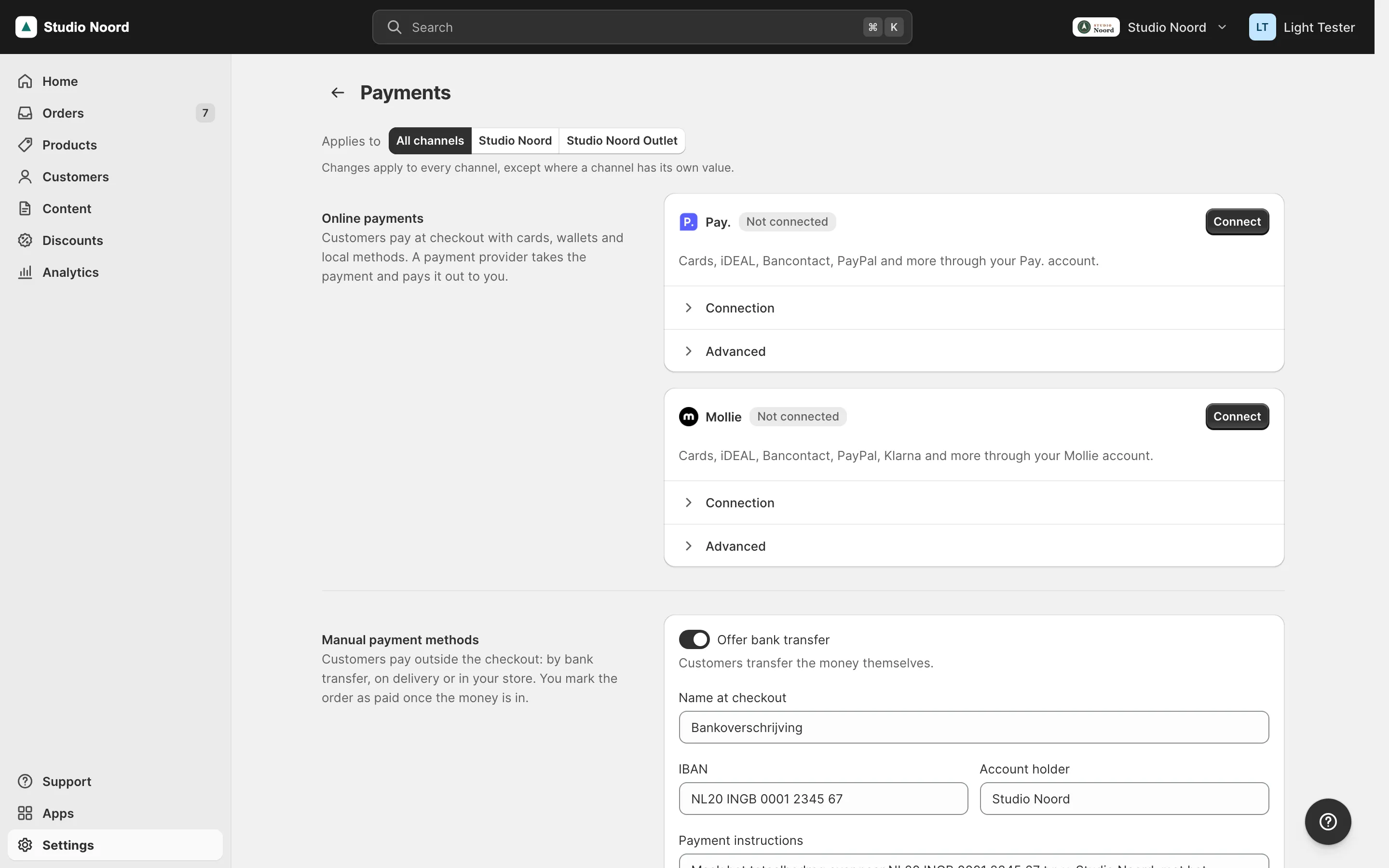
Settings > Payments has two bands. "Online payments" holds a card per payment provider module, then the providers Light only lists ("Other online payments"). "Manual payment methods" holds bank transfer, cash on delivery and pay in store. Your bridge module for a payment extension registers the provider in the pool payment_providers, an argument providers of Mrx\Settings\Model\Payments\ProviderDetector, in etc/adminhtml/di.xml. The item's key is the provider code.
| Key | Meaning |
|---|---|
label | the provider's name, as the merchant knows it |
prefix | the start of every payment method code the provider registers; the only required key |
own_section | true when your module sets the provider up on this page; Light then leaves it out of "Other online payments" |
state | a Mrx\Settings\Api\PaymentProviderStateInterface: while isOffered() is false, Light counts the provider's methods as off. A provider that can be connected per channel implements ChannelPaymentProviderStateInterface (since 0.3.0) instead |
card | a Mrx\Settings\Api\PaymentProviderCardInterface: with own_section, Light draws the provider's card |
logo | a view file id (Vendor_Module::images/logo.png), shown 20px high |
description | one line shown while the provider isn't connected; use translate="true" |
dashboard_url | the provider's own dashboard, in the card's More actions |
config_section | the stock section with the provider's payment methods, for "Manage payment methods" |
advanced_section | the stock section with the provider's other settings, for the Advanced panel's button |
resource | the ACL resource to connect the provider and switch its methods, checked next to Magento_Payment::payment |
sort_order | the order of the cards and of the names on Home's payments step |
module | the module that must be enabled for the item to count |
Mrx_PaymentsMollie registers Mollie like this. The item names a card, so Light draws Mollie's card and Mollie's forms go inside it:
<item name="mollie" xsi:type="array">
    <item name="label" xsi:type="string">Mollie</item>
    <item name="prefix" xsi:type="string">mollie_</item>
    <item name="own_section" xsi:type="boolean">true</item>
    <item name="state" xsi:type="object">Mrx\PaymentsMollie\Model\Mollie\ProviderState\Proxy</item>
    <item name="card" xsi:type="object">Mrx\PaymentsMollie\Model\Mollie\ProviderCard\Proxy</item>
    <item name="logo" xsi:type="string">Mollie_Payment::images/mollie_logo_configuration_tab.png</item>
    <item name="description" xsi:type="string" translate="true">Cards, iDEAL, Bancontact, PayPal, Klarna and more through your Mollie account.</item>
    <item name="dashboard_url" xsi:type="string">https://my.mollie.com/dashboard</item>
    <item name="config_section" xsi:type="string">mollie_payment_methods</item>
    <item name="advanced_section" xsi:type="string">mollie_general</item>
    <item name="resource" xsi:type="string">Mollie_Payment::config</item>
    <item name="module" xsi:type="string">Mollie_Payment</item>
    <item name="sort_order" xsi:type="number">20</item>
</item>
Pay. (Mrx_PaymentsPaynl) is a provider without a master switch: no single Pay. setting turns it off while its credentials stay. Its state class answers isOffered() on its own, true while the credentials are complete and a checkout method is on, in every channel. Until then Light counts Pay.'s methods as off:
public function isOffered(): bool
{
    return $this->everyChannel(fn (?int $channelId): bool => $this->connection->isOffered($channelId));
}
isOffered() answers for the whole shop: true only while the provider is offered in every channel. When a merchant can connect or switch on your provider for one channel only, implement Mrx\Settings\Api\ChannelPaymentProviderStateInterface (since 0.3.0) instead. It extends PaymentProviderStateInterface with one method:
public function isOfferedIn(?int $channelId): bool;With a channel (website) id, answer for that channel; with null, give the same answer as isOffered(). Settings > Payments asks it when it saves one channel, so "Keep at least one payment method on" lets a channel that pays through your provider switch its manual methods off, and refuses one where your provider is off. Under All channels it still asks isOffered(). A state that implements only PaymentProviderStateInterface keeps working: it is asked isOffered() for every channel. Mollie and Pay. implement the channel interface; Pay.'s answers through the connection of that channel:
public function isOfferedIn(?int $channelId): bool
{
    return $channelId === null ? $this->isOffered() : $this->connection->isOffered($channelId);
}
Register the state as a \Proxy, as above. After you add the interface to a state class, delete its generated proxy (generated/code/<Vendor>/<Module>/.../ProviderState/Proxy.php): an older proxy doesn't forward isOfferedIn(), so the call fails, is logged and counts as not offered.
Before your module lets a merchant switch off its last method, or disconnect, ask Mrx\Settings\Api\PaymentMethodsInterface whether customers can still pay another way:
public function hasOtherCheckoutMethod(string $exceptPrefix, ?int $channelId): bool;Pass your own method prefix. A null channel asks every channel and is true only when each has another method. A provider whose switch a channel can override asks channel by channel. "Free" doesn't count as another way to pay, and neither does a method that only charges what a customer saved before: a stored card of Magento_Vault or a PayPal billing agreement. Magento ships PayPal's billing agreement switched on, also in a shop without a PayPal account, so without this rule every shop with Magento_Paypal would pass the check.
A bridge adds no setup step. Home's "Accept payments" (the key payments of setup_steps) belongs to core: it names the providers of payment_providers in their sort_order through a description_provider, and it is done once a payment method works at checkout.
Light owns the card: header, status badge, account line, test-mode warning, method strip and three panels. Your module supplies its data and two forms. Each method answers for a channel ($channelId, a website id) or, for null, all channels, from stored config or your module's own cache, so the page never waits for the provider's API:
    public const STATUS_NOT_CONNECTED = 'not_connected';
    public const STATUS_OFF = 'off';
    public const STATUS_TEST = 'test';
    public const STATUS_NO_METHODS = 'no_methods';
    public const STATUS_LIVE = 'live';

    /**
     * One of the STATUS_ constants, for a channel (its website) or, for null, all channels.
     */
    public function getStatus(?int $channelId): string;

    /**
     * The account the shop is connected to, as the merchant knows it (a profile or sales location); '' while not
     * connected.
     */
    public function getAccountName(?int $channelId): string;

    /**
     * The methods the merchant can switch in Light, in the provider's order.
     *
     * @return list<array{code: string, title: string, active: bool, logo: string}> logo: an absolute URL or ''
     */
public function getMethods(?int $channelId): array;getStatus()returns one value. When several are true, return the first of not connected, off at checkout, test mode, no methods on, live. Light maps it to the badge: "Not connected", "Off at checkout", "Test mode" (warning), "No methods on" (warning) or "Live" (success). Any other value, or a call that throws, shows "Status unknown"; Light logs the exception and the rest of the page renders.- Pay.'s
ProviderCardis the worked example. It reads stored config and an answer from Pay. that it keeps for a quarter of an hour, so the page never waits for Pay.'s API, and maps Pay.'s own status onto the constants:
return match ($this->connection->getStatus($channelId)) {
    Connection::STATUS_LIVE => self::STATUS_LIVE,
    Connection::STATUS_TEST => self::STATUS_TEST,
    Connection::STATUS_NO_METHODS => self::STATUS_NO_METHODS,
    default => self::STATUS_NOT_CONNECTED,
};getAdvancedRows()returns up to six read-only rows (label,value, already formatted) for the Advanced panel.- In test mode the card shows "Test mode is on. Orders placed now aren't really paid, so don't ship them." with a button that opens your Connection panel and focuses the element you mark
data-mrx-provider-test-mode.
The two panels are your own templates, as children of the band block:
<block class="Mrx\Settings\Block\Settings" name="mrx.settings.payments.online" template="Mrx_Settings::page/payments/online.phtml" after="mrx.settings.scope" before="mrx.settings.payments">In your module's light_settings_payments.xml, add blocks under <referenceBlock name="mrx.settings.payments.online"> with as="<code>_methods" (the method switches) and as="<code>_connection" (keys, test mode, Connect or Disconnect). A panel shows only while its block has output, and only to an admin with the item's resource.
Pay.'s layout file adds both panels, each with its own template and the @api view models:
<referenceBlock name="mrx.settings.payments.online">
    <block class="Magento\Backend\Block\Template" name="mrx.payments.paynl.connection" as="paynl_connection" template="Mrx_PaymentsPaynl::settings/connection.phtml">
        <arguments>
            <argument name="view_model" xsi:type="object">Mrx\PaymentsPaynl\ViewModel\PaynlSection</argument>
            <argument name="icons" xsi:type="object">Mrx\Light\ViewModel\Icons</argument>
        </arguments>
    </block>
    <block class="Magento\Backend\Block\Template" name="mrx.payments.paynl.methods" as="paynl_methods" template="Mrx_PaymentsPaynl::settings/methods.phtml">
        <arguments>
            <argument name="view_model" xsi:type="object">Mrx\PaymentsPaynl\ViewModel\PaynlSection</argument>
            <argument name="icons" xsi:type="object">Mrx\Light\ViewModel\Icons</argument>
        </arguments>
    </block>
</referenceBlock>- A panel is your
<form>, and it posts to your own settings page. Save only the keys the post carries: a missing key stays unchanged, so each panel saves on its own. - Attach the save bar (
Mrx_Settings/js/settings-form) to the methods form only.save-barkeeps one bar per form, so give the connection form its own buttons ("Save connection"). - The link
#payments-<code>-connectopens your card's Connection panel, for a Home step or a palette entry. - Draw fields with the
@apiview modelMrx\Settings\ViewModel\Fields(layout argumentfields), not withMrx\Settings\Block\Settings.field(),select(),multiselect()andtoggle()give the markup of core's pages. With the optionpath, a control shows its channel note ("Changed for …" with the reset link, the lock note, or "… uses its own value") and is disabled while the setting can't differ per channel. Under it, each store view with a value of its own from the advanced view gets "Changed for Deutsch in the advanced view" with "Remove the Deutsch value", which the save oflight/settings/savecarries out (Store-view values from the advanced view). Leavepathoff a control whose text your page keeps per store view itself, or its translations show as such values.icon()renders a Light icon.
A pack that charges shipping its own way
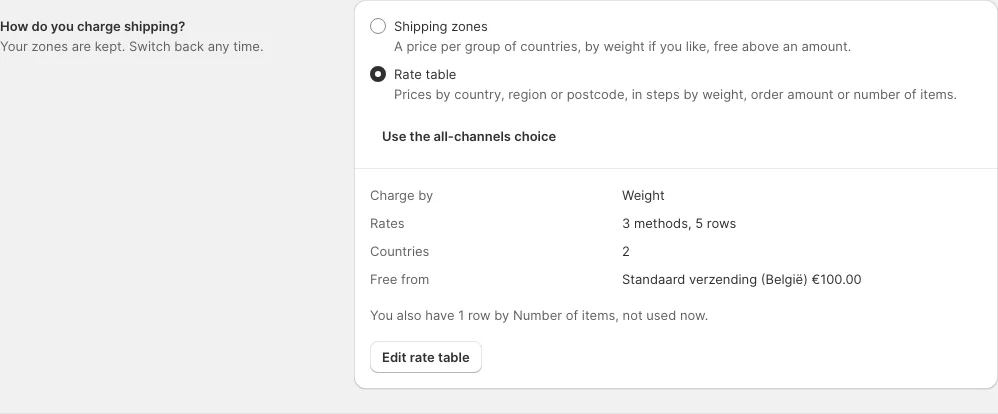
Settings > Shipping and pickup charges shipping through zones, stored as JSON on the flat rate carrier. A pack whose carrier calculates rates another way (a rate table, a carrier's live prices) tells core so through one config path, mrx_settings/shipping/rates_from. It holds zones (the default) or the code of the carrier that charges shipping instead, for all channels or per website.
| Value | What core does |
|---|---|
zones, flatrate or empty | As always: the zones card shows, and a save for all channels stores flat rate as on |
a carrier code, while carriers/<code>/active is on in that scope and carriers/<code>/model is set | The zones card folds to a note ("Another delivery method charges shipping now. Your zones are kept."), posts no zones and leaves them stored; a save for all channels no longer switches the flat rate back on |
Core checks the carrier's model because a removed module takes its config.xml default with it, while its saved active row stays behind; a stale value then changes nothing. The page's other checks work as before: when another carrier is on, a save passes the "add a shipping rate" check, so your active carrier counts as a rate.
Your pack offers the choice and writes three values in one save() of Mrx\Settings\Api\ScopedConfigWriterInterface, for all channels (null) or one website: mrx_settings/shipping/rates_from set to your carrier code, your carrier's active set to '1' and carriers/flatrate/active set to '0'. To switch back, write zones, carriers/flatrate/active '1' and your carrier's active '0'. Write the flags as '1' and '0': for all channels the writer stores a value that differs from the stored one, and for a website it stores any value that differs from what the website reads now, also one equal to the all-channels value. To let a website follow the all-channels choice again, write null for the three paths. Core never writes the path itself, and the zones survive every switch. Tell merchants to switch back to zones before they remove your pack: without your card nothing offers the choice, and the zones stay folded while your carrier is still installed and on.
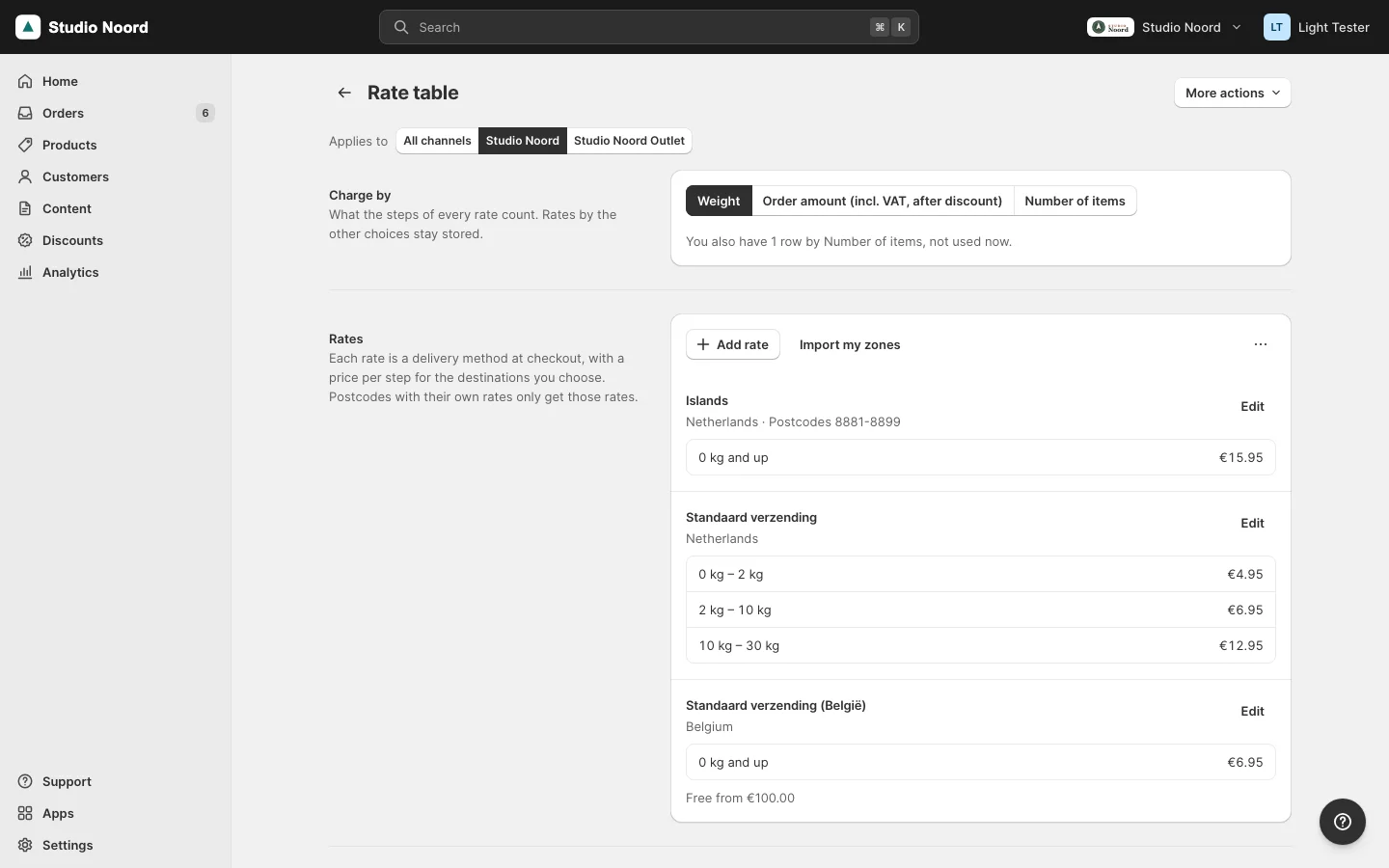
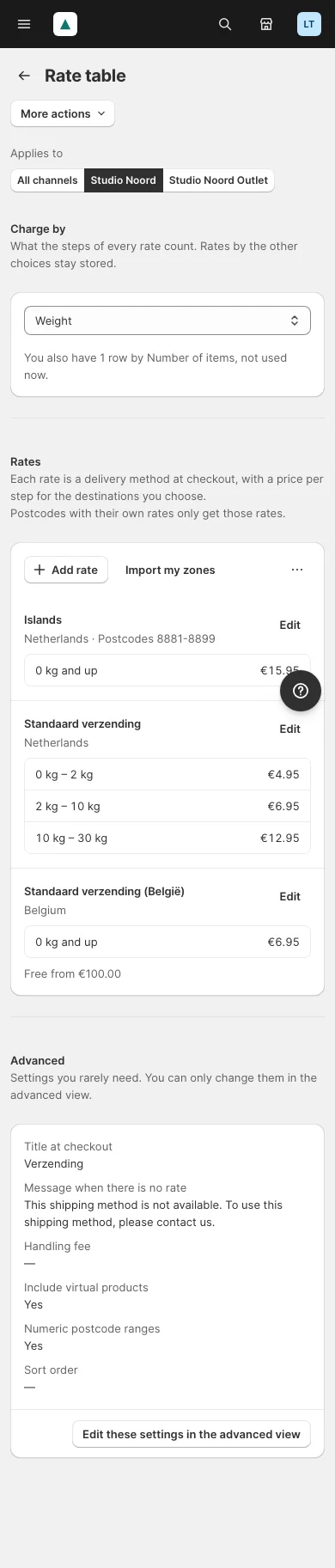
The rate table pack mrx/module-shipping-matrixrate (Install) works this way for MatrixRate. Its block mrx.ratetable.choice sits in content of light_settings_shipping before mrx.settings.shipping, outside the Shipping form, with its own request: picking the other choice confirms, writes the three values and reloads. Its Rate table page lives at its own route, light/ratetable/index, with a page item ratetable in settings_pages only for the save; no other pool entry points at that code, because light/settings/ratetable doesn't exist.
Legal page drafts
Settings > Legal pages drafts a text per legal page type and language. Two pools in etc/adminhtml/di.xml describe them. legal_page_types (an argument types of Mrx\Settings\Model\LegalPages\LegalPageManager) lists the kinds of legal page, with label, description, sort_order and languages, which limits a type to shops that sell in one of those languages. Core registers the types every shop needs; Mrx_CountryNl adds the German withdrawal instructions:
<item name="withdrawal" xsi:type="array">
    <item name="label" xsi:type="string" translate="true">Withdrawal instructions</item>
    <item name="description" xsi:type="string" translate="true">The official German model text (Widerrufsbelehrung) with the model withdrawal form. Required when you sell to Germany.</item>
    <item name="sort_order" xsi:type="number">25</item>
    <item name="languages" xsi:type="array">
        <item name="de" xsi:type="string">de</item>
    </item>
</item>
legal_page_templates (an argument templates of Mrx\Settings\Model\LegalPages\Templates) holds the drafts, by type and then language. Each is an HTML file in a view folder, with {{name}}-style placeholders filled from the business details:
<item name="de" xsi:type="array">
    <item name="title" xsi:type="string">Rückgabe und Rücksendung</item>
    <item name="identifier" xsi:type="string">rueckgabe-und-ruecksendung</item>
    <item name="file" xsi:type="string">Mrx_CountryNl::legal_page_templates/de/returns.html</item>
    <item name="placeholder" xsi:type="string">[bitte ergänzen</item>
    <item name="variables" xsi:type="object">Mrx\CountryNl\Model\LegalPages\GermanVariables</item>
</item>fileisModule_Name::pathunder the module'sview/adminhtml.placeholderis the text that marks a part the merchant still fills in.variablesnames a class that implementsMrx\Settings\Api\LegalPageVariablesInterface, for placeholders that language alone needs, such as the register line of a German legal notice. A variables class that throws is logged, and the draft renders without its values.- The item's parent key is the legal page type. A country module adds a type or a language to an existing type; the pools take a
nullitem to remove one.
Ship it as a pack
A country or a payment provider ships as its own module outside core, so a shop that doesn't need it never loads it. Mrx_CountryNl ("Light for the Netherlands", in packages/module-country-nl) is the example: every Dutch fact on this page sits in its files, and no core file names it. A pack is a Light module with three things to get right.
The package declares the API range it was built for (Versioning):
"extra": {
    "mrx-light-api": "^0.4"
}
registration.php carries the range guard, so the pack doesn't register with a Light that doesn't satisfy it:
    ComponentRegistrar::register(ComponentRegistrar::MODULE, 'Mrx_CountryNl', __DIR__);
}
module.xml sequences every core module whose pools the pack fills, so DI merges its items after core's:
<module name="Magento_Tax"/>
<module name="Magento_User"/>
<module name="Mrx_Light"/>
<module name="Mrx_Settings"/>
<module name="Mrx_Catalog"/>
<module name="Mrx_Home"/>
<module name="Mrx_Content"/>
<module name="Mrx_Orders"/>
<module name="Mrx_Discounts"/>
The pack names only @api types and catalogued pools. The doctor and the compatibility gate treat it like any module: run bin/magento mrx:light:doctor --module=Mrx_CountryNl. Where a pack changes a core item by key or sets a core block's arguments, that is tier 2 (Changing Light for one shop), so the pack ships in the same release as core and gets retested with every minor.
A pack for another country follows the same shape: its items in country_rules, carriers, legal_page_types, legal_page_templates and page_templates, its wording through referenceBlock. Ask for a knownPacks line in the release that ships it, so the doctor rule country_pack (Troubleshooting) warns a shop based in that country that runs without the pack:
<item name="NL" xsi:type="array">
    <item name="module" xsi:type="string">Mrx_CountryNl</item>
    <item name="package" xsi:type="string">mrx/module-country-nl</item>
</item>
What the admin sees
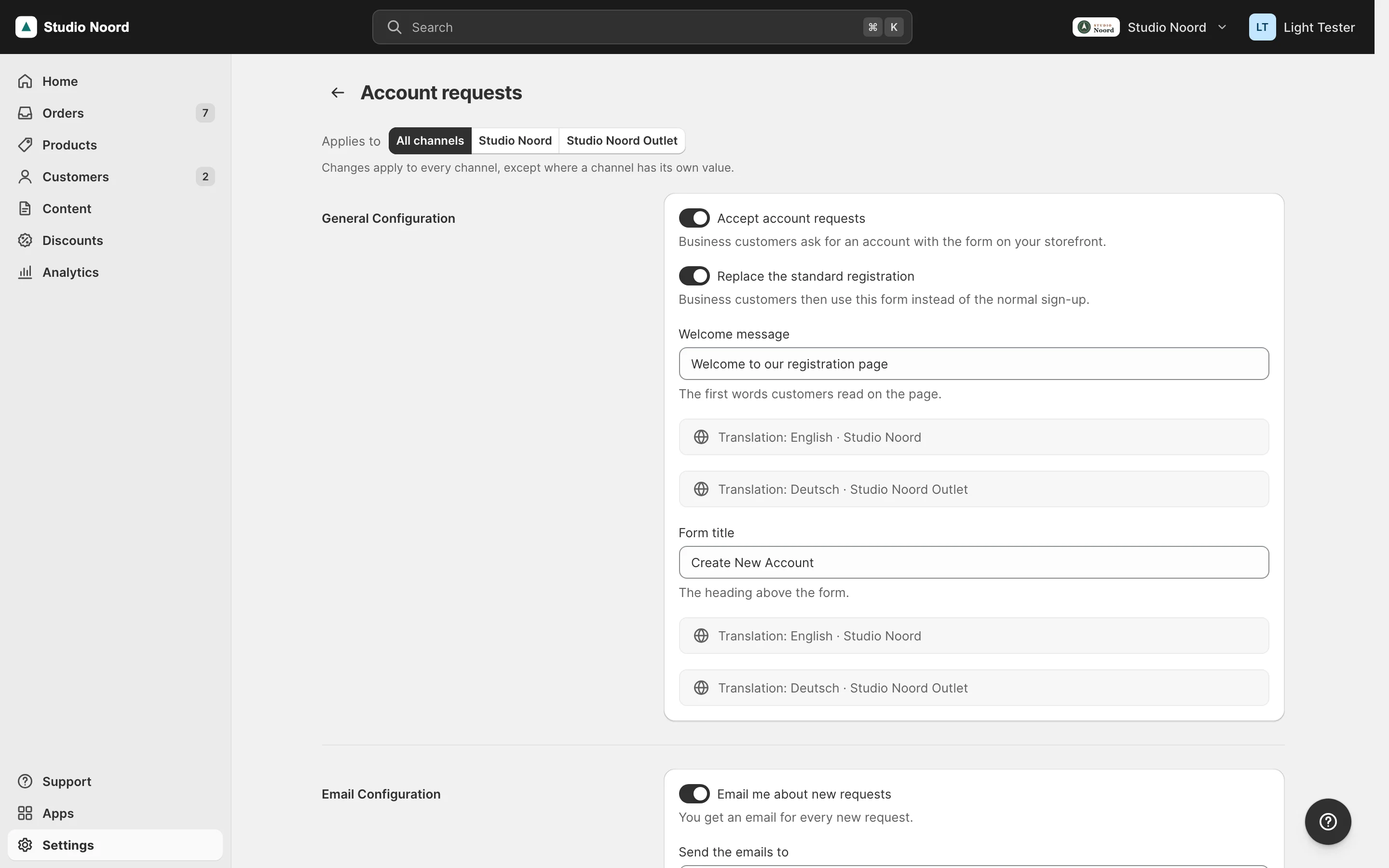
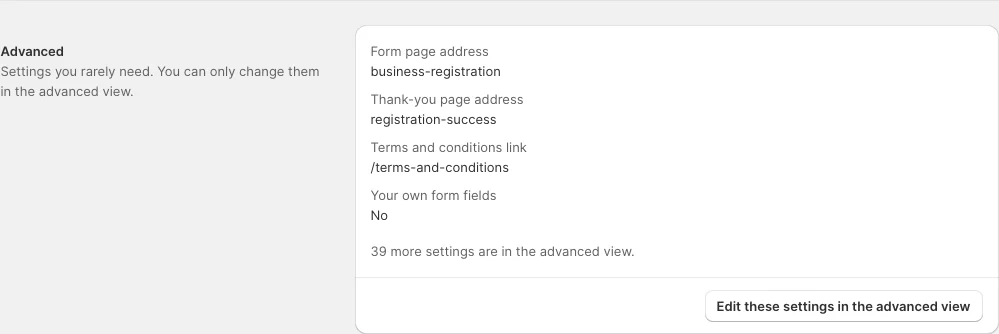
- Simple mode. The page lists the named fields with their labels and notes, "Applies to" for store-view fields, the store-view inputs and the Advanced section. The stock section URL opens this page.
- Advanced mode. The stock section, unchanged.
ACL
The page asks for the section's own ACL resource from system.xml, and each email row for its resource.
Check it
bin/magento mrx:light:doctor --module=<your module>:schema_fieldreports a field insimple,advanced,labelsornotesthat the section doesn't have, anadvancedentry that is insimpleor can't show as a row, andunknown_referencewith kindsectiona section that doesn't exist.tests/playwright/settings-schema.spec.tsis the test to copy.
Pitfalls
- A field that
simplenames butsystem.xmlhides withshowInDefault="0"shows nothing at default scope. - Settings pages are keyed by code in
admin_userbookmarks and URLs: never rename a page code (Versioning).
Last updated on