A brand package
Your name, logo and default theme on Light, from one di.xml file.
Light core is brand-neutral: without a brand package, the admin shows the platform's own logo, Mage-OS on Mage-OS and Magento on Magento Open Source. A brand package puts an agency's or a product's name, logo and default theme on it, with one di.xml file and no PHP. MageRex_Branding is the committed example.
When to use it
- You sell Light under your own name, or set it up for a client who wants their logo in the admin.
- One brand per shop: the highest
prioritywins. Don't ship a brand inside a feature module (Built for Light, rule 1).
Steps
1. The module
A module with registration.php, composer.json (with extra.mrx-light-api, and the same range on mrx/module-light and mrx/module-themes under require if you list them), etc/module.xml that sequences Mrx_Light and Mrx_Themes, etc/adminhtml/di.xml, the images under view/adminhtml/web/images/ and i18n/nl_NL.csv. It has no Light PHP, so it needs no range guard.
2. The brand
A BrandPool item (pool brands) in etc/adminhtml/di.xml, keyed by the brand code. The keys are named by where they show:
<item name="magerex" xsi:type="array">
<item name="label" xsi:type="string">MageRex</item>| Key | Where it shows |
|---|---|
label | The word beside a mark where no lockup shows, the alt text of a lockup, and "%1 home" |
short_name | The browser tab title; default label |
logo.on_light | The square mark for a light surface: the phone menu while the theme makes it light, and a sign-in card without a lockup |
logo.on_dark | The mark for a dark surface: a phone's top bar and the phone menu while it is dark. Each of the two falls back to the other |
logo.lockup_on_dark | An optional full lockup, word mark included, for a dark surface: it replaces mark and word in the top bar on wide screens and in the phone menu while it is dark. A phone's top bar keeps the mark |
login.lockup | An optional full lockup for a light surface: the light sign-in card, and the phone menu while it is light |
login.lockup_on_dark | The lockup for a dark sign-in card; the phone menu uses it too when logo.lockup_on_dark is empty |
login.tagline | The line on the sign-in card |
favicon | A view file id; svg, png and ico get their type from the extension |
default_theme.mode, .theme, .light, .dark | The store default theme when the owner never saved one |
platform | mage-os, magento, or empty for any |
priority | The highest wins; ties go by code |
module, disabled | The usual gate |
Light needs a file per surface, because a logo drawn for a dark surface vanishes on a light one. MageRex_Branding sets a navy and a white icon as its marks, a white-and-amber lockup for dark surfaces and a navy one for light surfaces, and the navy icon as its favicon:
<item name="logo" xsi:type="array">
    <item name="on_light" xsi:type="string">MageRex_Branding::images/magerex-icon-blue.svg</item>
    <item name="on_dark" xsi:type="string">MageRex_Branding::images/magerex-icon-white.svg</item>
    <item name="lockup_on_dark" xsi:type="string">MageRex_Branding::images/magerex-logo-on-dark.svg</item>
</item>
<item name="favicon" xsi:type="string">MageRex_Branding::images/magerex-icon-blue.svg</item>
<item name="login" xsi:type="array">
    <item name="lockup" xsi:type="string">MageRex_Branding::images/magerex-logo-blue.svg</item>
    <item name="lockup_on_dark" xsi:type="string">MageRex_Branding::images/magerex-logo-on-dark.svg</item>
Where a lockup shows, Light prints no label beside it, since the lockup carries the word mark. Where none fits the surface, the mark and the label show instead, never a lockup drawn for the other surface. The shell sets the height and the file sets the width: 34 pixels for a lockup in the top bar, 28 for a mark, 40 for a lockup on the sign-in card. Crop each SVG's viewBox to the drawing, or the logo shows padded.
3. The default theme
default_theme picks the store default when none was saved: MageRex_Branding picks Baken with Noordzee as its dark half. A default an admin saved stays, and an admin's own choice wins over both.
<item name="theme" xsi:type="string">baken</item>4. Reading the brand
Templates and modules read the active brand through Mrx\Light\Api\Branding\BrandInterface::get(), which returns a Brand value object with the keys in camelCase and the view file ids resolved to URLs: label, shortName, logoOnLight, logoOnDark, loginLockup, loginLockupOnDark, loginTagline, favicon, faviconType, defaultTheme, code and logoLockupOnDark.
An owner's own upload always wins. Once the owner uploads any logo or icon on Settings > Appearance > Your own theme, get() returns the owner's files only, whichever theme is active: every lockup and mark of your brand goes, a slot the owner left empty is '', and label holds the store name, so that slot shows the store name as text. Your files and the owner's are never shown side by side, as both name a brand. shortName, loginTagline and defaultTheme stay yours, and so does favicon until the owner uploads an icon. Read logo URLs from get() and expect upload URLs from pub/media/mrx_themes/logo.
The neutral fallback
Core registers the brands mage-os and magento, with priority 0 and the logos the stock admin shows. Light tells the platforms apart through Magento\Framework\App\DistributionMetadataInterface, which only Mage-OS has, because both report the product name "Magento". The Mage-OS and Magento logos belong to their owners: Light shows only the unmodified files the platform ships, where the stock admin shows them, and never beside another mark.
What the admin sees
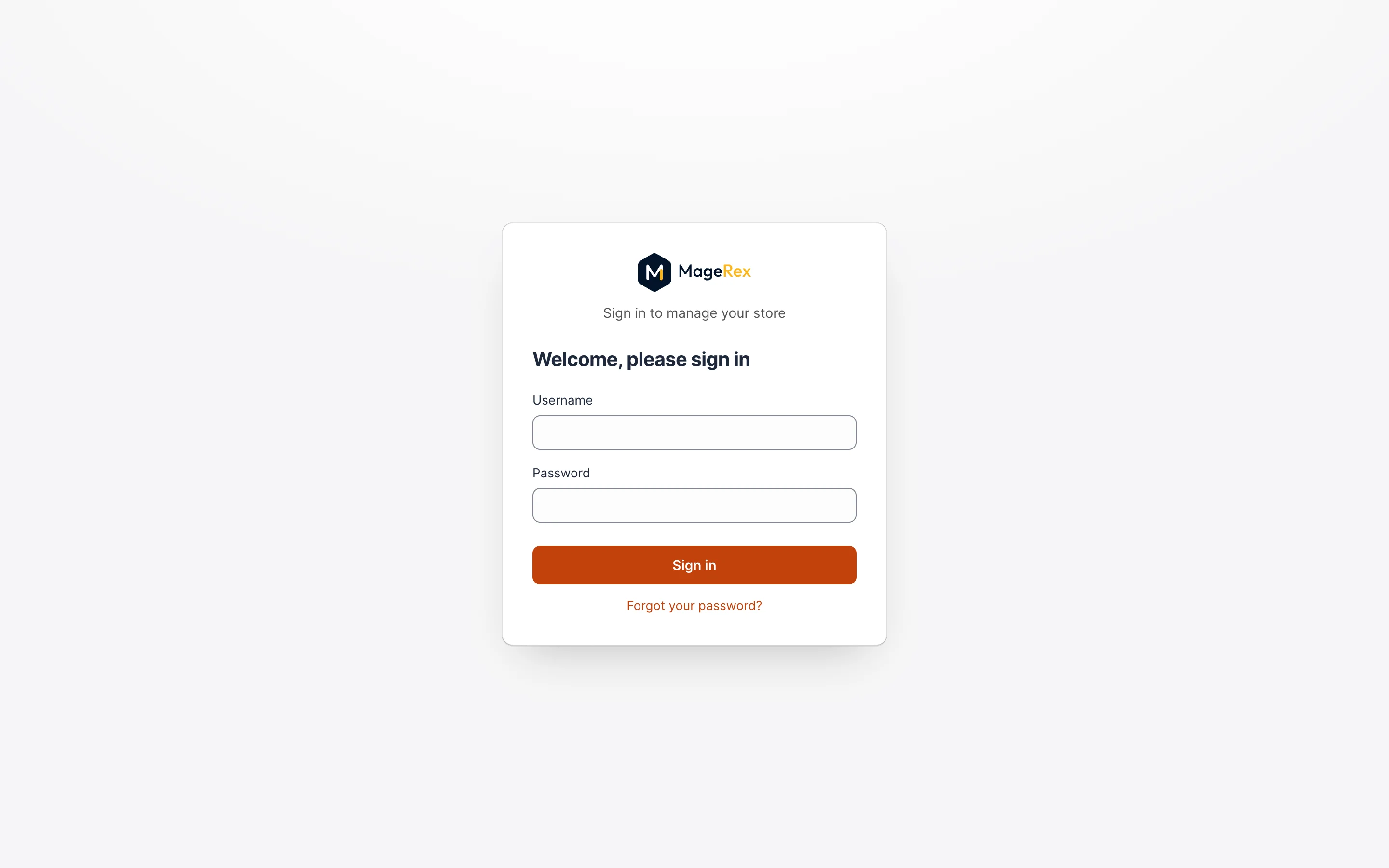
- Simple mode. The brand's lockup in the top bar on wide screens and in the phone menu, its mark in a phone's top bar, its lockup on the sign-in page, its favicon, and its default theme on a new shop.
- Advanced mode. The stock admin keeps the platform's own logo.
- The sign-in footer. Light prints no platform line under the sign-in card and the two-factor screens: neither Magento's copyright nor Mage-OS's "Thank you for choosing Mage-OS". The card already shows the active brand, with or without a brand package. A brand that wants a footer line adds its own block to the
login.footercontainer in itsview/adminhtml/layout/admin_login.xml; theBrandvalue class has no footer key.
ACL
None: a brand is data.
Check it
bin/magento mrx:light:doctor --module=<your module>:unknown_keycatches a misspelled key, dotted keys included.tests/guard/white-label.shandtests/playwright/white-label.spec.tsprove that Light core shows no brand of its own (Testing).- MageRex_Branding lives in
app/code/MageRex, outside the zero-core-edit guard, and was added without a core edit.
Pitfalls
- Any own upload of the owner replaces all of your logo files, not only the slot it fills (Settings > Appearance > Your own theme, Admin themes, section 5). Without an own icon the marks are empty, so a phone's top bar shows the owner's top-bar logo at 24 pixels high, and with no logo for a surface that surface shows the store name. Keep your lockup readable at 24 pixels too: a brand without marks shows it there.
- A logo or favicon file that doesn't resolve is logged, and that one field takes the neutral brand's value. A brand without
default_themetakes the neutral brand's. - A static label in XML (an ACL title, an email template label) can't read the brand; Light's own read "Light".
Last updated on