Getting started
A first Light app in about 15 minutes, as a bridge or built into your module, and the checklist before you ship.
This page takes you from nothing to a working Light app in about 15 minutes, once with pattern B (Light support built into your module) and once with pattern A (a bridge for a module you don't own). It ends with the checklist every module passes before it ships.
Before you start
- Run Magento in developer mode:
bin/magento deploy:mode:showprintsdeveloper. The scaffold only runs there, and only developer mode shows the compatibility banner on Light pages. - Every command below is
bin/magento …. On a RollDev environment useroll magento …, which runs the same command in the PHP container. - Light API: declare
^0.4during the beta, on Light API 0.4.0 (^1.0from the later 1.0.0 release). The scaffold writes the right range for the Light it runs on, so copy the range from what it generates rather than from this page. Versioning explains why the range matters. - Pick your own vendor and module name. This repository already holds
Acme_Helloand the pilot bridge as committed proofs, so the examples below would clash with them here.
Pick a pattern
| A. Bridge module | B. Built into the module | |
|---|---|---|
| Where the glue lives | Its own package <vendor>/module-<name>-light, module <Vendor>_<Name>Light | Your module's own package: XML glue in the base module, PHP glue in a second module <Vendor>_<Name>LightCompat |
| Changes to the base module | None | XML files. For the PHP part, a one-time move of the base module into src/ when it sits at the package root |
| Shops without Light | Don't install the bridge | Install the same package. The XML glue stays inert and the compat module never registers |
| Choose it for | Modules you don't own, and modules you want to keep free of Light code | Your own modules, when one package per module is worth following the pattern-B rules |
| Example | The pilot, Case study: disrex/module-request-an-account | docs/magerex-light/examples/acme-module-hello |
Pattern B in 15 minutes
Generate a module with a nav item, an app card, a settings page and a counter, under Content:
With --output-dir the scaffold writes this package, the golden example:
bin/magento mrx:light:app Acme_Hello --pattern=builtin --with=nav,app,settings,badge --parent=contentIt writes two sibling modules, app/code/Acme/Hello (the base module) and app/code/Acme/HelloLightCompat (the PHP glue), each with its own registration.php and composer.json. With --output-dir it writes the package layout instead, with src/ and LightCompat/ under one root composer.json; that is the layout of the example this page quotes, docs/magerex-light/examples/acme-module-hello. Its src/ is your app/code/Acme/Hello, and its LightCompat/ is your app/code/Acme/HelloLightCompat.
The base module holds XML only. Its nav item is a scalar DI item on a Light class. Without Light the class doesn't exist, and Magento's compiler ignores the item:
<item name="parent" xsi:type="string">content</item>The compat module holds the PHP. It registers only when Light is there, in a version its range accepts. This range guard is what lets the same package install on a shop without Light:
if (class_exists(\Mrx\Light\Api\ExtensionApi::class) && \Mrx\Light\Api\ExtensionApi::satisfies('^0.4')) {
    ComponentRegistrar::register(ComponentRegistrar::MODULE, 'Acme_HelloLightCompat', __DIR__);
}
The same range sits in extra.mrx-light-api of the root composer.json, so Light can tell which modules fit it:
"mrx-light-api": "^0.4"The compat module adds its controller to the light route and counts the open notes for the nav item:
<module name="Acme_HelloLightCompat" before="Mrx_Light"/>public function getBadgeValue(): ?BadgeSwitch it on:
bin/magento module:enable Acme_Hello Acme_HelloLightCompat
bin/magento setup:upgrade --keep-generated
bin/magento cache:clean
bin/magento mrx:light:doctor --module=Acme_HelloLightCompat
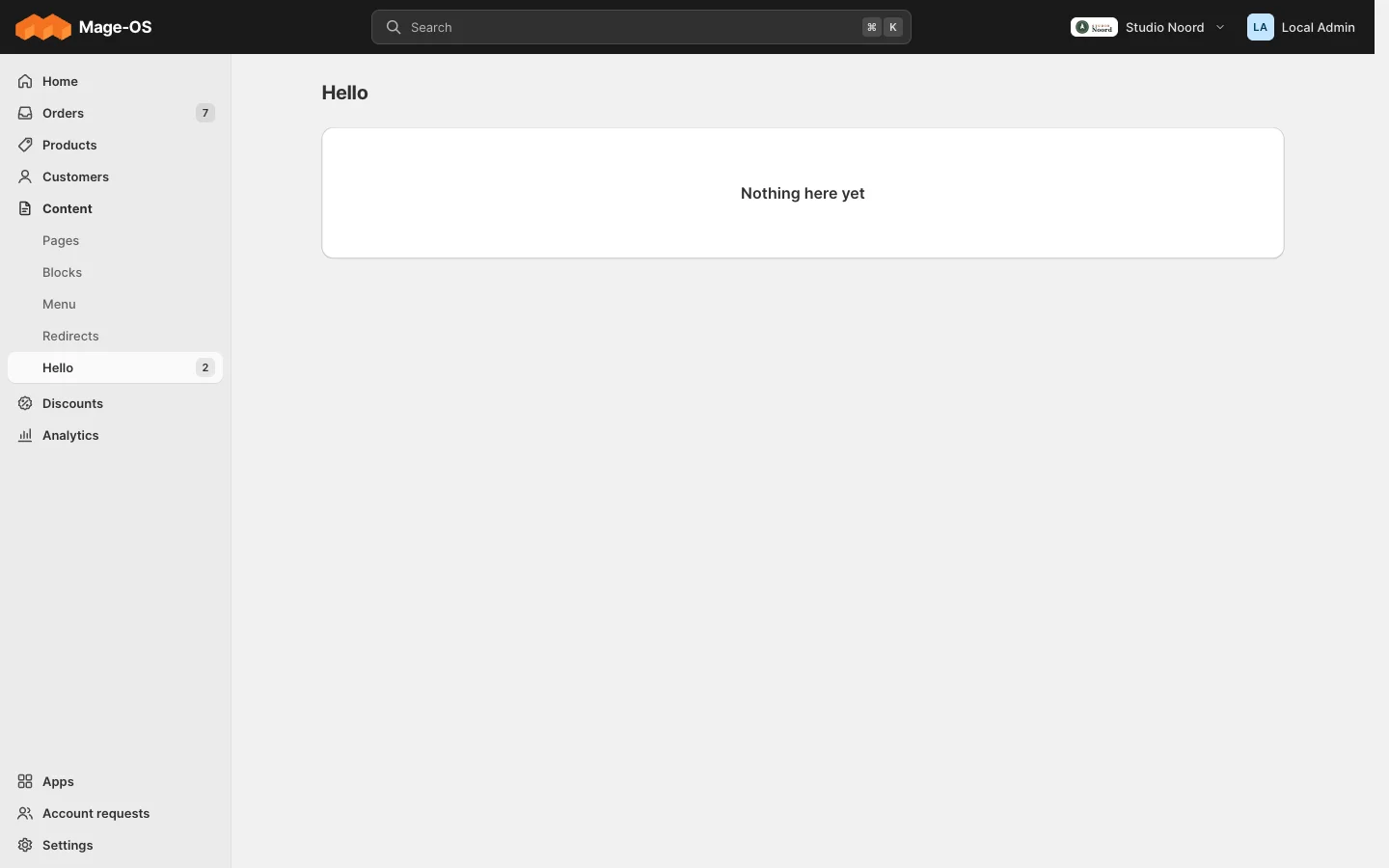
The doctor prints No problems found. In simple mode, Content now has a "Hello" item that opens the Light page light/hello/index, Apps has a "Hello" card that you can pin, and Settings > Apps opens its settings page. The counter shows as soon as there is an open note, a row in acme_hello_note with is_open 1. The scaffold writes no screen that adds notes, that part is your module's own work; bin/magento acme:hello:count prints the number, with or without Light.
Why it keeps working without Light. The compiler only scans registered modules, and the range guard leaves the compat module unregistered. The base module has no PHP that names a Light class, so it compiles and runs on any Magento. Testing shows how the checks prove both halves.
Pattern A in 15 minutes
Generate a bridge for an installed module, here Disrex_RequestAnAccount, with a nav item under Customers and a route map for its stock grid:
bin/magento mrx:light:app Acme_RequestAnAccountLight --for=Disrex_RequestAnAccount --with=nav,route-map --parent=customersThe scaffold reads the module's menu.xml, acl.xml and system.xml and writes the bridge to app/code/Acme/RequestAnAccountLight: registration.php with the range guard, composer.json, etc/module.xml, role access in etc/di.xml (the Customers area, because of --parent=customers), and in etc/adminhtml/di.xml the nav item and the route map. The nav item opens a Light start page, light/requestanaccountlight/index, whose More actions holds "Open in advanced view" to the module's own grid; in simple mode the route map sends that grid to the start page. The nav item takes the module's own ACL resource and its menu title, "Registration requests"; rename it after the job it does. The pilot bridge, Disrex_RequestAnAccountLight, was written by hand and does more, but its skeleton is the same. Its registration.php carries the range guard, because the bridge has Light PHP:
if (class_exists(\Mrx\Light\Api\ExtensionApi::class) && \Mrx\Light\Api\ExtensionApi::satisfies('^0.4')) {
    ComponentRegistrar::register(ComponentRegistrar::MODULE, 'Disrex_RequestAnAccountLight', __DIR__);
}
Its module.xml sequences the module it bridges and every Light module it plugs into:
<module name="Disrex_RequestAnAccount"/>
<module name="Mrx_Light"/>
Its nav item points at its Light list, and names the module's stock grid as fallback_route, which Light opens whenever no controller answers the Light route:
<item name="route" xsi:type="string">light/accountrequests/index</item>
<item name="fallback_route" xsi:type="string">requestanaccount/request/index</item>
Switch the bridge on with module:enable, setup:upgrade --keep-generated and cache:clean, then run bin/magento mrx:light:doctor --module=Acme_RequestAnAccountLight. Customers now has a "Registration requests" item that opens the start page. From here, the recipes add the rest: Light lists for the Light list, A nav item with a counter for the counter, A settings page from your system.xml for the settings page. Case study: disrex/module-request-an-account shows the finished bridge.
Before you ship
Tick every box.
The module
- One bridge per module. Name it after the module it bridges:
<Vendor>_<Name>Lightin<vendor>/module-<name>-light. Don't use theMrx_prefix: Light treats everyMrx_*module outside core as a gated third-party module anyway. - The Light API range.
extra.mrx-light-apiin yourcomposer.jsonstates the range, for example^0.4during the beta (^1.0from the later 1.0.0 release). A module inapp/codewithout a package keeps a smallcomposer.jsonin its own folder for it. A module with Light PHP puts the same range in the range guard of itsregistration.php. Out of range, Light hides the module (Versioning). -
requireholds the same range. If you listmrx/module-lightunderrequire, its range equalsextra.mrx-light-api; Magento's dependency check reads it. Pattern B never requires Light, and once the Light packages are published it puts the inverse range underconflict. -
module.xmlsequences the module you bridge,Mrx_Lightand every Light module you plug into. - The vendor boundary. Every reference to the bridged module's classes lives under
Model/Backend/,Plugin/orSetup/, and a unit test (Test/Unit/BoundaryTest.php) fails on any other. - Service contracts only. Use the bridged module's repositories and service contracts, never its blocks, templates or UI components.
- The module gate. Object items carry
#[RequiresModule]and are registered as\Proxy; array items carrymodule. - ACL reuses the bridged module's own resources.
- Translations. Every label has
translate="true", and the module ships a CSV for each locale Light ships (i18n/nl_NL.csvin the informal form,en_GBwhere your wording differs), plusi18n/de_DE.csvwhen it shows text on the storefront. - A browser test
tests/playwright/<feature>.spec.tsthat skips itself when the module is disabled, andtests/playwright/users-and-permissions.spec.tsstill passes. - The README lists the extension points you use, the versions you tested with ("tested with <module> x.y.z on Mage-OS 3.5.0 / PHP 8.5, Light API 0.4.0") and how to remove the module.
- The doctor is clean.
bin/magento mrx:light:doctor --module=<your module>reports no errors,private_apiincluded, and nodeprecated_use.
Built for Light (the six rules)
- Your screens sit under the section whose job they do, with a reason in the README for any new top-level item or category (rule 1).
- You used the smallest surface: a to-do before a widget, header actions in More actions (rule 2).
- Every counter is null at 0 and
attentionunless something is broken (rule 3). - Simple mode shows only everyday settings, named one by one (rule 4).
- No
pinned_by_default(rule 5). - Warm copy, the ui-kit badge words, and empty states that say what will appear (rule 6).
Scripts and CSP
- JavaScript is a RequireJS AMD module, started with
x-magento-init,data-mage-initor a form hook (Fields on a Light editor). - No executable inline
<script>, noon*=attributes and nojavascript:URLs; the doctor warns withinline_script. A script that must be inline goes throughSecureHtmlRenderer::renderTag(). - External hosts are listed in your
etc/csp_whitelist.xml. - Alpine.js and Tailwind are for the storefront only, never for admin screens.
Last updated on
Install Light
Install Light 0.4 in a Mage-OS or Magento Open Source shop from packages.disrex.nl, add Returns or rate tables, update, and what to check afterwards: the doctor, stock and locations, two-factor sign-in.
How Light fits together
The parts of Light, a request to a Light page, the three ways to plug in, and the public API, as diagrams.