Light lists
Your records in a Light list, and your columns and bulk actions on another module's list.
A Light list is the IndexTable block with a provider: columns, tabs, search, sorting, bulk actions and row actions, drawn the same way on every Light page. This recipe writes a provider for your own data, and adds columns and bulk actions to another module's list.
When to use it
- Your module has records the merchant works through: requests, returns, subscriptions. A Light list replaces the stock grid in simple mode.
- To show one more fact on a core list, add a column to it instead of a new screen (Built for Light, rule 2).
How a list loads
The page renders first, and the list asks for its rows in a request of its own, so a slow provider doesn't hold up the page. With the block argument first_rows, the page computes the first page itself and the list draws it without that request; Light's orders, products and customers lists do this. Leave it off for a provider that is slow, since the page then waits for it. Light checks your provider's ACL resource before it calls getRows(), and the extensions of other modules add their cells to your rows:
To turn it on for your list, add the argument to your IndexTable block, as the orders list does:
<argument name="first_rows" xsi:type="boolean">true</argument>The first page is the one light/table/data would answer for the same state: the page reads tab, q, sort, dir, page and the channel from its own URL, the block's default_tab, default_sort, page_size and fixed filters, and never a filter from the URL. When the list's state turns out different, or the provider throws (logged), the list asks for its rows as before. A list that arrives with its rows fires mrx:table:loaded right after your scripts of the same task attached; a script that may run later checks indexTable.get(element).loadedOnce (and .rows) as well as listening for the event.
Steps
1. The provider
A class that implements ProviderInterface answers the table's questions: its columns, tabs, default sort, search placeholder, bulk actions, empty state and rows:
public function getRows(Query $query): array;Light lets go of the admin session before it calls your provider, so badges, rows and search answers run in parallel: read the session, never write to it here; a write is lost.
The pilot's provider reads the requests through its own backend service. Its empty state says what will appear:
'text' => (string)__('When a business customer fills in the sign-up form, the request shows up here.'),Each row carries id, url (the row opens it), cells and meta. meta holds the facts row actions test, such as status.
Prop
Type
2. Register it
The provider goes in the ProviderPool argument providers (pool table_providers), keyed by the table code, as a \Proxy. The page's layout puts Mrx\Light\Block\IndexTable with that code in content (Your own list and detail pages). A provider class with #[RequiresModule] makes the list not exist while its module is off: the block renders nothing, and the list's data URL answers 404.
3. Bulk and row actions
- Bulk actions come from
getBulkActions(): a label, a route that receivesids[], aresource, atoneand aconfirmtext for destructive ones. The route is your own JSON controller (Your own list and detail pages). - Asking from the route. When only the route knows that an action needs the admin's yes (it would replace something the selection holds), it answers HTTP 409 with
{"success": false, "message": "...", "confirm": {"title": "...", "message": "...", "label": "...", "param": "confirmed"}}and writes nothing. The list shows that question and, on yes, posts the sameids[]again withparam(defaultconfirmed) set to1. Light's category list does this for "Show in menu" when a language has its own setting. - Row actions come from a provider that also implements
RowActionsInterface: each names a bulk action and themetait needs, such as "Mark handled" when{status: 'new'}. - Row-only actions. An action that makes sense on one record at a time, such as opening it in an editor, sets
row_only(since 0.3.0): the bulk bar leaves it out, and a row action that names it runs it on that one row (ids[]holds one id). A list whose bulk actions are all row-only gets no checkboxes. Pair it withmodedownloadandtarget_blankto open a page in a new tab without a popup blocker: the form posts in the click.
The keys of a bulk action:
Prop
Type
4. Columns on another module's list
A class that implements ProviderExtensionInterface adds columns and bulk actions to a list it doesn't own, and fills them in decorateRows(). It goes in the IndexTable\ExtensionPool argument extensions (pool table_extensions), keyed by the table code and then by your key. Returns adds a return status column to the orders list:
<item name="orders" xsi:type="array">
    <item name="returns" xsi:type="object">Mrx\Returns\Model\IndexTable\OrdersReturnStatus\Proxy</item>
</item>
Its column and bulk action keys start with <your key>_, and never reuse a key the table has.
- A column or bulk action with another key is skipped and logged, so an extension never replaces the list's own column or action.
- Your columns follow the provider's own, or come right after the column named in
after. They are never sortable, and take part in the admin's column choice like the others (hideable,default_hidden). - Your bulk actions go before the provider's first critical action, and only show with their
resource. decorateRows()gets the rows of the page that is shown, aftergetRows(), with the sameQuery. Only your own columns' cells are taken, matched by rowid, so fetch them for the whole page in one query.- An extension that throws in
getColumns()orgetBulkActions()adds nothing; one that throws indecorateRows()keeps its columns with empty cells. The list and the other extensions keep working.
While the rows load, the list shows skeleton rows with its own column count, and a reload slower than 200 ms swaps the old rows for skeleton rows; you write nothing for that. A list or search of your own outside Block\IndexTable gets the same with Mrx_Light/js/loader and the table or list preset (Design system, Loading states).
What the admin sees
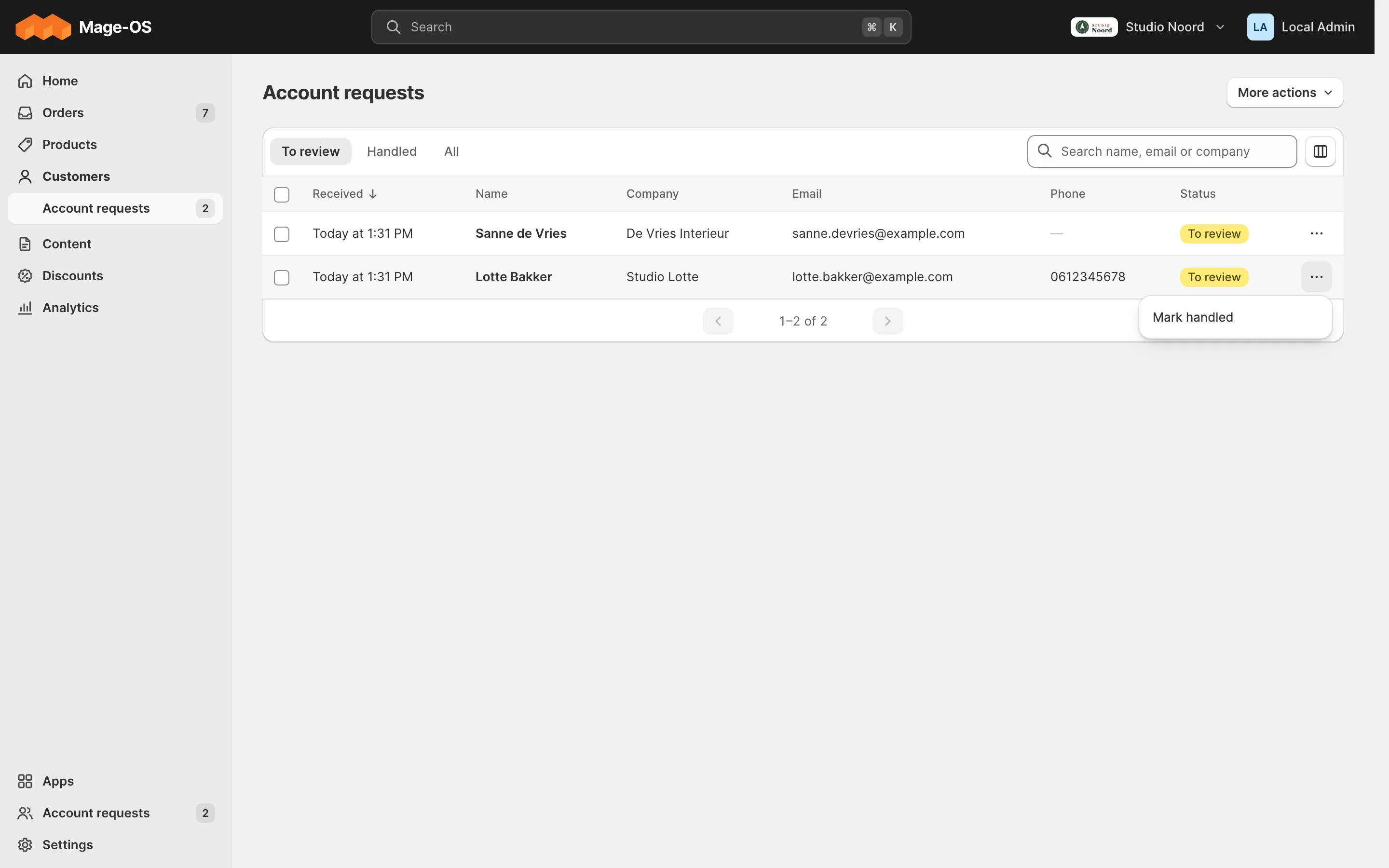
- Simple mode. The list with its tabs, search and sortable columns, checkboxes for bulk actions and a row menu for row actions. The admin chooses and orders columns; Light remembers it per admin.
- Advanced mode. The stock grid. With a route map, the list's mode switch opens it (The advanced view, the route map and header actions).
ACL
getAclResource() guards the whole list, and each bulk action its own resource.
Check it
bin/magento mrx:light:doctor --module=<your module>:unknown_keyandwrong_areacatch a misregistered provider or extension.- Copy the list checks of
tests/playwright/pilot-request-an-account.spec.ts.
Pitfalls
- Stock mass-action controllers (
MassAction\Filter,selected[]andnamespace, a redirect) are not bulk targets. Add your own controller that calls your service. - Long bulk work goes to cron or the message queue, answers with a toast, and reports through a Home to-do.
- A bulk action can't ask for a value yet. Edit values in bulk in the advanced view.
- The value pickers in
products-index.jsare internal. - Filter and sort extensions for other modules' lists are not in the 0.1.0 beta.
Last updated on