A nav item with a counter
A nav item under the right section, and a counter that shows the same work everywhere.
A nav item takes the merchant to your screen; a counter on it says that work is waiting there. Light shows the same count on the nav item, on the app's pin, in the palette and on Home.
When to use it
- Add a nav item under the section whose job your screen does (Built for Light, rule 1).
- Add a counter only for work: requests to review, returns to handle. Return null at 0 and use
attentionunless something is broken or blocks a sale (rule 3).
How a count reaches the page
Rendering a page never runs your counter. The nav reads the last counts from the cache type mrx_light_badges, and one background request after the page loads asks for the counts that are stale or missing:
Home to-dos and the palette read the same count through BadgeReaderInterface::get(), which runs a stale provider at once. A pinned app shows the count of its badge_from nav item.
Counts mean work
Return null at 0, and keep the tone attention unless something is broken or blocks a sale.
Steps
The pilot bridge's files that this recipe quotes:
1. The nav item
A nav item (pool nav_items) in etc/adminhtml/di.xml, with the section as parent, your Light route, a fallback_route for when the Light page isn't there, and match so the item is highlighted on your pages:
<item name="account_requests" xsi:type="array">
    <item name="label" xsi:type="string" translate="true">Account requests</item>
    <item name="parent" xsi:type="string">customers</item>
    <item name="route" xsi:type="string">light/accountrequests/index</item>
    <item name="fallback_route" xsi:type="string">requestanaccount/request/index</item>
Nav items that depend on data, such as one item per warehouse, come from a class that implements ItemProviderInterface, registered in the Navigation\Config argument providers (pool nav_providers). Its items take the same keys, plus url: a ready admin URL that Light uses instead of route, and an unsafe one drops the item. Light calls each provider at most once per request, on every page with the nav, so read from a cache or one cheap query. A di.xml item with the same key wins over the provider's, and a provider that throws is logged and its items left out.
The doctor reads files and never calls a provider, so it can't see the keys a provider returns. Name them with #[ProvidesNavItems] on the class when a counter, a to-do or a child item points at one:
#[RequiresModule('MageRex_Support')]
#[ProvidesNavItems('support')]
class SupportItem implements ItemProviderInterface
Leave out keys that only exist at runtime, such as one per warehouse. The doctor reads the attribute from the class and its parents, so a \Proxy carries it, and it skips a provider whose #[RequiresModule] names a module that is off.
2. The counter
A class that implements BadgeSourceInterface returns a Badge or null:
public function getBadgeValue(): ?Badge;Light lets go of the admin session before it calls your provider, so badges, rows and search answers run in parallel: read the session, never write to it here; a write is lost.
The pilot counts the requests to review. The label is what a screen reader says, in the admin's language:
if ($count <= 0) {
    return null;
}

return new Badge($count, 'attention', (string)($count === 1
    ? __('%1 account request to review', $count)
    : __('%1 account requests to review', $count)));
A badge has no URL: every place that shows the count links to its own target.
3. Register the counter
A BadgePool providers item (pool nav_badge_providers), keyed by a code of your own, names the nav item. rollup also counts on the parent while its section is closed:
<item name="disrex_account_requests" xsi:type="array">
    <item name="item" xsi:type="string">account_requests</item>
The keys are item, provider, resource (default: the nav item's), module, rollup, ttl (seconds a count stays fresh, default 60, at least 10) and sort_order:
Prop
Type
Core declares the same list in the catalogue:
<item name="keys" xsi:type="string">item provider resource module rollup ttl sort_order</item>Several modules can count on one nav item: Light adds the counts, shows the most urgent tone and joins the labels.
4. Drop the count when the work is done
Light keeps each count in the cache type mrx_light_badges and refreshes it in the background at most once per ttl. When your code changes what you count, drop the cached count at once with BadgeCacheInterface::invalidate(). It works in every area, so a storefront observer, a REST call or a cron job can call it too. The pilot does it after a status change:
$this->badgeCache->invalidate('account_requests');5. The same count on pins, in the palette and on Home
- Pins. A pinned app shows the count of its claim's
nav_key, or ofbadgefor a declared app (An app, its category and pins). - Palette. The nav item's "Go to" entry shows the count by itself.
- Home. A to-do with
badgeshows the count while it is above 0 (Home to-dos, setup steps and widgets).
Moving from badges to providers
Before the 0.1.0 beta a counter implemented BadgeProviderInterface and was registered in the BadgePool argument badges (pool nav_badges), one per nav item:
public function getBadgeValue(): ?Badge;That still works: Light turns each entry into a provider with the nav item's resource. A string of digits becomes a count; other text shows only when it is the item's only counter. Move to providers to get a tone, a spoken label, roll-up and several counters per item. To retire an entry another module put in badges, set it to null, as Orders does for Light's own orders entry:
<item name="orders" xsi:type="null"/>What the admin sees
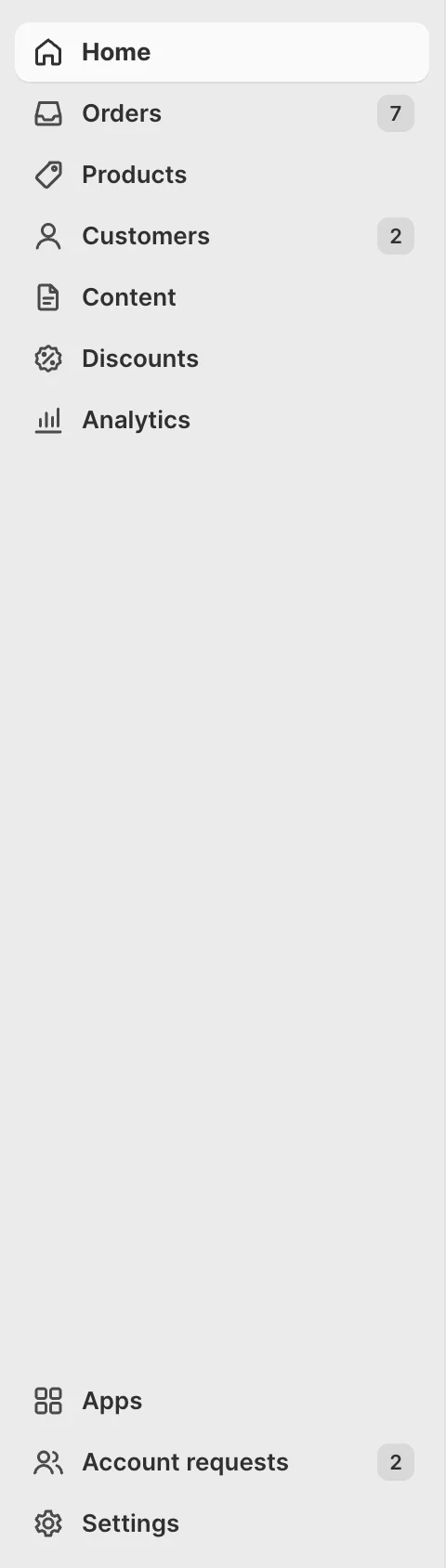
- Simple mode. "Customers 5" while Customers is closed (roll-up), "Account requests 5" inside it, the same count on the pin and under "Go to" in the palette, and "5 account requests to review" on Home. A fresh count appears a moment after the page loads, when the cache had none.
- Advanced mode. The stock menu, without Light counts.
ACL
Each provider counts only for admins with its resource. A Staff role without the module's resource sees none of the counts.
Check it
bin/magento mrx:light:doctor --module=<your module>:unknown_referencewith kindparentoritemcatches a misspelled key, or a provider's key that#[ProvidesNavItems]doesn't name,nav_sortandnav_shortcuta clash with another item.bin/magento cache:clean mrx_light_badgesclears every count.tests/playwright/pilot-request-an-account.spec.tschecks the count everywhere.
Pitfalls
- A count that shows late, or only after a reload: the cache type
mrx_light_badgesis disabled in Cache Management, so every page asks in the background (Troubleshooting). - A counter class whose constructor needs another module's classes is registered as
\Proxy, with#[RequiresModule].
Last updated on